
Press Release
Mareel Expands AI Portrait Restyling, Age Progression, and Photo Editing Tools

Mareel gives U.S. creators, photographers, and ecommerce teams a unified AI Image workspace to restyle portraits, run realistic age transformations, swap faces, and sharpen product or campaign photos from one account.
Los Angeles, California, United States, 16th Nov 2026 – Mareel (https://mareel.ai/) gives U.S. creators, photographers, and ecommerce teams a unified AI Image workspace to restyle portraits, run realistic age transformations, swap faces, and sharpen product or campaign photos from one account.
Static image workflows often split between basic filter apps that flatten facial detail and complex node setups that require local GPU hardware. Mareel combines curated style templates with prompt-based photo editing in a standard web browser, supporting up to 16 reference images on compatible models and output resolutions up to 4K.
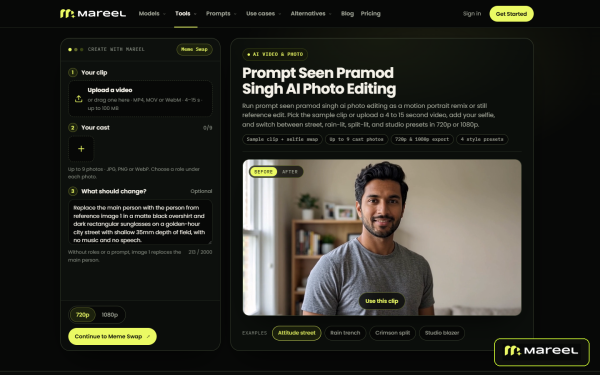
Creators following viral social portrait trends can run motion portrait remixes or still edits across street, rain-lit, and studio presets with the Prompt Seen Pramod Singh AI photo editing tool. For casting and character timelines, AI age progression previews younger and older versions of a subject while preserving bone structure and identity.
Broader restyling and talent swaps run in the same studio. Users transform existing photos into new lighting, materials, or art styles using the image-to-image workflow, or replace faces across campaign stills with matched lighting in photo face swap.
When source files need technical cleanup or layout changes before publishing, teams recover crisp edge and texture detail with the image sharpener and handle object edits, background swaps, or outfit changes inside the AI image editor. Saved characters and product kits stay in the workspace Library so users can carry the same face or item straight into video production.
Before any image job starts, Mareel checks the selected model’s supported aspect ratios and reference limits and shows the exact credit cost on the Generate button.
“A strong visual campaign usually starts with getting the still image right,” said a spokesperson for Mareel. “Whether a creator is testing a viral portrait prompt, aging a character for a storyboard, or sharpening catalog shots, keeping those image tools next to our video studios saves constant file exports.”
Mareel runs on desktop web browsers at https://mareel.ai/. Eligible new accounts receive one-time sign-up credits, and paid plans start at $15 per month.
About Mareel
Developed by Rockbase Global Limited, Mareel is an all-in-one AI creative platform that brings leading image and video models into one workspace. Through AI Image, AI Video, AI Avatar, Ad Studio, Canvas, and Marketing Lab, teams produce and manage visual assets from one credit balance.
Media Contact
Organization: Mareel
Contact Person: Mareel Media Team
Website: https://mareel.ai/
Email: Send Email
City: Los Angeles
State: California
Country: United States
Release id: 50754
View source version on King Newswire:
Mareel Expands AI Portrait Restyling, Age Progression, and Photo Editing Tools
About Author

Disclaimer: The views, suggestions, and opinions expressed here are the sole responsibility of the experts. No Digi Observer journalist was involved in the writing and production of this article.

Mareel gives U.S. storytellers, animation creators, and performance marketers one web workspace to produce multi-scene story videos, anime sequences, lip-synced presenter clips, and social ad variations under a single credit balance.
Los Angeles, California, United States, 16th Nov 2026 – Mareel (https://mareel.ai/) gives U.S. storytellers, animation creators, and performance marketers one web workspace to produce multi-scene story videos, anime sequences, lip-synced presenter clips, and social ad variations under a single credit balance.
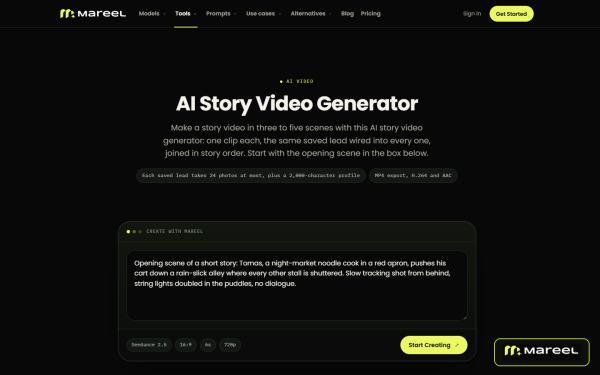
Producing serialized stories or multi-angle ad campaigns with AI usually breaks down between shots: characters change faces from clip to clip, and teams have to download dozens of fragments into an external editor just to see a rough cut. Mareel solves both problems by pairing reusable character profiles (built from up to 24 reference photos) with a node-based Canvas and built-in clip assembly.
Narrative creators can turn written prompts or episodic scripts into multi-shot visual sequences in the AI story video generator, or produce stylized 2D and 3D motion pieces with the AI animation generator. On Canvas, teams break a script into shot nodes and assemble two to eight finished clips into one MP4 at no extra credit cost.
For Japanese-inspired visual styles, creators turn character art and prompts into fluid motion in the AI anime video generator. Social editors can also generate high-detail close-up eye sparkle loops using the anime star eye tool.
Commercial and social teams switch to AI Avatar and Ad Studio in the same browser tab. Users pair a single portrait with a script or audio file to create a lip-synced presenter in talking photo, or rebuild a winning commercial structure around an imported Shopify or Amazon product using Ad Remix.
“Creators building a 10-part story series and marketers testing five ad hooks face the same hurdle: keeping the cast consistent from shot to shot,” said a spokesperson for Mareel. “Putting character profiles, anime and story generators, and free clip assembly in one workspace lets teams finish the whole cut in one place.”
Mareel is available on desktop web browsers at https://mareel.ai/, with one-time sign-up credits for eligible new accounts and paid plans starting at $15 per month.
About Mareel
Mareel is an all-in-one AI video and image platform developed by Rockbase Global Limited. The workspace connects leading generative models with AI Video, AI Image, AI Avatar, Ad Studio, Canvas, and Marketing Lab under one credit balance and one Library.
Media Contact
Organization: Mareel
Contact Person: Mareel Media Team
Website: https://mareel.ai/
Email: Send Email
City: Los Angeles
State: California
Country: United States
Release id: 50755
View source version on King Newswire:
Mareel Connects Storyboard Video, Anime Generation, and Ad Remix in One Studio
About Author
Disclaimer: The views, suggestions, and opinions expressed here are the sole responsibility of the experts. No Digi Observer journalist was involved in the writing and production of this article.
Mareel gives U.S. video editors, social teams, and performance marketers browser-based AI video editing tools to shift camera perspectives, reframe aspect ratios, restyle clips, and clean up existing footage without reshooting.
Los Angeles, California, United States, 16th Nov 2026 – Mareel (https://mareel.ai/) gives U.S. video editors, social teams, and performance marketers browser-based AI video editing tools to shift camera perspectives, reframe aspect ratios, restyle clips, and clean up existing footage without reshooting.
Production teams often wrap a shoot only to realize a clip was framed only for horizontal players, includes a distracting background object, or carries burned-in captions from an earlier edit. Instead of booking a reshoot or painting out frames by hand, users upload an MP4, MOV, or WebM clip up to 100 MB into Mareel’s AI Video studio and describe the change in plain English.
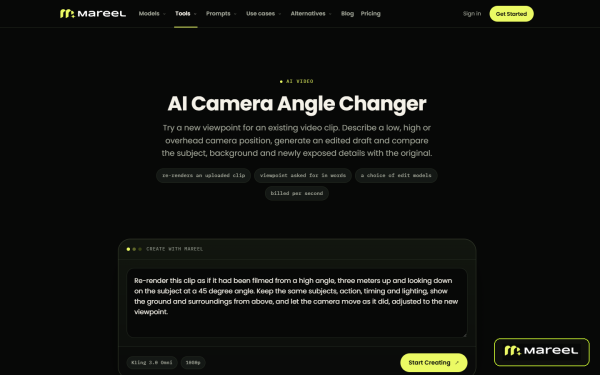
To get new shot coverage from a single take, editors use the AI camera angle changer to shift perspective while keeping the subject and lighting consistent. When a widescreen spot needs to run on vertical feeds, AI video reframe converts footage between 16:9, 9:16, and 1:1 without cutting off the subject.
Scene revisions and look development happen in the same studio. Teams swap props, weather, or backgrounds through written instructions in the AI video editor, and apply unified color or stylistic treatments across clips using AI video filters.
For asset cleanup and localization, users erase unwanted passersby, wires, or clutter with the remove object from video tool. Editors repurposing international ad spots can also strip old burned-in captions using remove subtitles from video, and attach up to four reference images during an edit to guide replacement elements.
Every job displays its exact credit cost on the Generate button upfront and runs in the background so editors can queue several revisions at once.
“Post-production bottlenecks usually come from small fixes that take hours in a timeline editor,” said a spokesperson for Mareel. “Giving teams direct tools to re-angle a shot, reframe for vertical feeds, or strip old subtitles lets them get more mileage out of footage they already own.”
Mareel is available on desktop web browsers at https://mareel.ai/, with one-time sign-up credits for eligible new accounts and paid plans starting at $15 per month.
About Mareel
Mareel is an all-in-one AI video and image platform developed by Rockbase Global Limited. The web workspace unites leading generative models across AI Video, AI Image, AI Avatar, Ad Studio, Canvas, and Marketing Lab under one credit balance and one Library.
Media Contact
Organization: Mareel
Contact Person: Mareel Media Team
Website: https://mareel.ai/
Email: Send Email
City: Los Angeles
State: California
Country: United States
Release id: 50753
View source version on King Newswire:
Mareel Simplifies Video Re-Angling, Aspect-Ratio Reframing, and Footage Cleanup
About Author
Disclaimer: The views, suggestions, and opinions expressed here are the sole responsibility of the experts. No Digi Observer journalist was involved in the writing and production of this article.
Press Release
Leadde Connects Real Estate Video Creation and URL to Video Workflows With Multilingual Tools
Leadde links its AI real estate video maker and URL-to-video generator with in-place floor plan image translation and 88-language video localization.
Singapore, 16th Nov 2026 – Leadde (https://leadde.ai/) provides property marketing teams, brokerages, and relocation agencies with a web workspace that links its real estate video maker and url to video workflows directly with in-place image localization and multilingual video dubbing under one account.
Residential brokerages and commercial leasing teams publish dozens of property pages, floor plans, and neighborhood packets every week. Turning those static listings into narrated walkthroughs for domestic and overseas buyers usually forces marketing coordinators to jump between three or four separate tools. An agent might copy listing bullets from a web portal into a slide deck, ask a designer to relabel a JPG floor plan for international clients, and hire an external voice actor to record a second language track.
When price terms, HOA fees, or square-footage figures change before an open house, updating a rendered video file across multiple languages means rebuilding the timeline from scratch.
Turning property pages and listing documents into editable video scenes
Inside the Leadde workspace, marketing teams can start a listing walkthrough from a live web page, a presentation deck, or a property brochure. When a brokerage already has a published property page or neighborhood guide online, operators use the url to video maker as a link to video generator that pulls structured points from the source page into an editable scene outline.
For teams working from offline packets, the ai real estate video generator and real estate listing video maker workflows connect with AI Video Creator and Slide Presenter. Users upload PDF, PPTX, DOC, DOCX, or TXT files, select a target duration such as Summary or Balanced, and toggle Keep Original Images so verified property photos and architectural diagrams carry into the draft.
In Slide Presenter, agents import PDF or PPTX pitch decks up to 50 slides and 200 MB. PowerPoint uploads keep slide layers editable on the canvas and let brokers import their speaker notes directly as spoken narration. Before opening the studio, reviewers inspect an interactive scene Outline to reorder rooms, adjust price disclosures, or trim neighborhood highlights.
Translating floor plans and property graphics in place
International property marketing often stalls on visual attachments rather than spoken narration. A luxury condo tour dubbed into Spanish, Mandarin, or Arabic still looks incomplete if the embedded floor plan, transit map, and energy-efficiency chart remain in English.
Inside the AI Tools sidebar, image translation lets coordinators localize flattened JPG and PNG graphics directly in the browser. Users upload a single floor plan or open Batch Translate & Edit to process an entire folder of property visuals, pick a target language, and replace embedded text labels in place. The tool helps preserve original label placement, basic layout, background elements, and visual context so room dimensions and amenity callouts stay readable without requiring the source CAD or Photoshop file. When a brokerage starts from a full listing presentation, PPT Translation in AI Tools also converts the PowerPoint file while working to keep text boxes, shapes, and slide layouts intact.
Scaling property tours across 88 languages and 15+ lip-sync voices
Once the visual assets are ready, Leadde offers two video translation workflows for cross-border buyers and investors. When a property walkthrough is assembled inside the Leadde studio, clicking Translate on the editor toolbar or project share page converts both the spoken narration and the editable on-canvas text strings into 88 languages and 175 dialects. Each localized version is saved as a separate project draft, allowing regional agents to open the Spanish or Japanese version, resize an expanded headline, and verify street-name pronunciation before exporting.
When an agent records an on-site walkthrough on a phone or camera, Video Dubbing in AI Tools accepts uploaded MP4 and MOV footage directly. Users select from 15+ target dubbing languages and toggle lip-sync so the presenter’s mouth movements match the translated audio track. Across all studio projects, teams can set custom pronunciation rules that apply to the full script for subdivision names, insert pause cards from 0.1 to 99 seconds, apply nine subtitle styles, or clone an agent’s voice from 10 to 60 seconds of clear MP3, WAV, or M4A audio.
“Property marketers lose days whenever a listing update or an overseas inquiry forces them to re-edit floor plans and re-record voiceovers in separate apps,” said a spokesperson for Leadde. “By keeping web link conversion, floor plan image translation, and editable multilingual video drafts in one workspace, a brokerage can turn a domestic listing into a localized video tour in a single afternoon.”
Explaining mortgage steps, disclosures, and commercial leases
Beyond property tours, agencies and lending partners use the explainer video maker as a business explainer video maker and product explainer video maker to walk clients through escrow timelines, closing costs, and commercial lease terms. Authors pair scripts with 300 AI avatars, apply the Expressive IV engine for up to 60 seconds of full-body movement and facial expression per video, or use timeline entrance, exit, and emphasis animations and Create Media (Motion V2, billed by credit) to highlight financial tables step by step.
Availability and pricing
Leadde is available on the web at https://leadde.ai/. The Free plan ($0/month) includes 200 monthly credits, videos up to 10 minutes, and 1080p MP4 exports. Starter ($25/month, or $18/month billed annually) provides 2,000 monthly credits, watermark removal, and SRT/VTT subtitle downloads. Creator ($69/month, or $41/month on promotional annual billing) offers 7,000 monthly credits, Brand Kits, custom fonts, and 4K MP4 exports, and Enterprise plans add shared Team Workspaces.
About Leadde
Leadde is an AI video and visual communication workspace for educators, product teams, real estate professionals, and global organizations. It combines document-to-video creation, 300 AI avatars, 88 languages and 175 dialects, and visual localization tools under one credit balance.
Media Contact:
Leadde Media Team
Email: support@leadde.ai
Website: https://leadde.ai/
Media Contact
Organization: LEADDE PTE. LTD.
Contact Person: Leadde Media Team
Website: https://leadde.ai/
Email: Send Email
Country: Singapore
Release id: 50769
View source version on King Newswire:
Leadde Connects Real Estate Video Creation and URL to Video Workflows With Multilingual Tools
About Author
Disclaimer: The views, suggestions, and opinions expressed here are the sole responsibility of the experts. No Digi Observer journalist was involved in the writing and production of this article.
Mareel Connects Storyboard Video, Anime Generation, and Ad Remix in One Studio
Mareel Expands AI Portrait Restyling, Age Progression, and Photo Editing Tools
Mareel Simplifies Video Re-Angling, Aspect-Ratio Reframing, and Footage Cleanup
Benzinga Money Article Discusses How to Become Part of the 12% of Retirees Who Have Achieved the Recommended $550,000 Minimum Retirement Savings Threshold
Apu Apustaja Conquers New York with Lively Street Ads, Including Times Square Billboard
Bay Smokes Maintains Quality Amid Legislative Changes in the Hemp Industry


-
Press Release4 days ago
Midwest Ragdolls Explains Why Playful Kitten Biting Is Often Misunderstood
-
Press Release4 days ago
ARCPE Holding, LLC Highlights the Importance of Understanding Local Real Estate Market Conditions
-
Press Release3 days ago
Red Banyan CEO Evan Nierman Leads High-Stakes Communications Workshop at NASDDDS Annual Conference
-
Press Release2 days ago
IntelliVIX Wins Two CES 2027 Innovation Awards, Showcasing Global Competitiveness in Safety AI
-
Press Release7 days ago
Altegio Announces Open Platform Connecting Beauty and Wellness Businesses With AI Agents at Web Summit 2026
-
Press Release4 days ago
Dasher Personalized Running Highlights Personalized Half Marathon Training Plans Focused on Injury Prevention and Sustainable Progress
-
Press Release2 days ago
Rifstone Capital LLC Advances Institutional Research Platform with Expanded Global Allocation Framework
-
Press Release5 days ago
Rantizo (Nasdaq: RNTZ) Advances U.S. Production of Heavy-Lift Autonomous Drones After $258.8 Million Acquisition, Targets California’s $61.2 Billion Agricultural Market