
Press Release
Leadde Connects Real Estate Video Creation and URL to Video Workflows With Multilingual Tools

Leadde links its AI real estate video maker and URL-to-video generator with in-place floor plan image translation and 88-language video localization.
Singapore, 16th Nov 2026 – Leadde (https://leadde.ai/) provides property marketing teams, brokerages, and relocation agencies with a web workspace that links its real estate video maker and url to video workflows directly with in-place image localization and multilingual video dubbing under one account.

Residential brokerages and commercial leasing teams publish dozens of property pages, floor plans, and neighborhood packets every week. Turning those static listings into narrated walkthroughs for domestic and overseas buyers usually forces marketing coordinators to jump between three or four separate tools. An agent might copy listing bullets from a web portal into a slide deck, ask a designer to relabel a JPG floor plan for international clients, and hire an external voice actor to record a second language track.
When price terms, HOA fees, or square-footage figures change before an open house, updating a rendered video file across multiple languages means rebuilding the timeline from scratch.
Turning property pages and listing documents into editable video scenes
Inside the Leadde workspace, marketing teams can start a listing walkthrough from a live web page, a presentation deck, or a property brochure. When a brokerage already has a published property page or neighborhood guide online, operators use the url to video maker as a link to video generator that pulls structured points from the source page into an editable scene outline.
For teams working from offline packets, the ai real estate video generator and real estate listing video maker workflows connect with AI Video Creator and Slide Presenter. Users upload PDF, PPTX, DOC, DOCX, or TXT files, select a target duration such as Summary or Balanced, and toggle Keep Original Images so verified property photos and architectural diagrams carry into the draft.
In Slide Presenter, agents import PDF or PPTX pitch decks up to 50 slides and 200 MB. PowerPoint uploads keep slide layers editable on the canvas and let brokers import their speaker notes directly as spoken narration. Before opening the studio, reviewers inspect an interactive scene Outline to reorder rooms, adjust price disclosures, or trim neighborhood highlights.
Translating floor plans and property graphics in place
International property marketing often stalls on visual attachments rather than spoken narration. A luxury condo tour dubbed into Spanish, Mandarin, or Arabic still looks incomplete if the embedded floor plan, transit map, and energy-efficiency chart remain in English.
Inside the AI Tools sidebar, image translation lets coordinators localize flattened JPG and PNG graphics directly in the browser. Users upload a single floor plan or open Batch Translate & Edit to process an entire folder of property visuals, pick a target language, and replace embedded text labels in place. The tool helps preserve original label placement, basic layout, background elements, and visual context so room dimensions and amenity callouts stay readable without requiring the source CAD or Photoshop file. When a brokerage starts from a full listing presentation, PPT Translation in AI Tools also converts the PowerPoint file while working to keep text boxes, shapes, and slide layouts intact.
Scaling property tours across 88 languages and 15+ lip-sync voices
Once the visual assets are ready, Leadde offers two video translation workflows for cross-border buyers and investors. When a property walkthrough is assembled inside the Leadde studio, clicking Translate on the editor toolbar or project share page converts both the spoken narration and the editable on-canvas text strings into 88 languages and 175 dialects. Each localized version is saved as a separate project draft, allowing regional agents to open the Spanish or Japanese version, resize an expanded headline, and verify street-name pronunciation before exporting.
When an agent records an on-site walkthrough on a phone or camera, Video Dubbing in AI Tools accepts uploaded MP4 and MOV footage directly. Users select from 15+ target dubbing languages and toggle lip-sync so the presenter’s mouth movements match the translated audio track. Across all studio projects, teams can set custom pronunciation rules that apply to the full script for subdivision names, insert pause cards from 0.1 to 99 seconds, apply nine subtitle styles, or clone an agent’s voice from 10 to 60 seconds of clear MP3, WAV, or M4A audio.
“Property marketers lose days whenever a listing update or an overseas inquiry forces them to re-edit floor plans and re-record voiceovers in separate apps,” said a spokesperson for Leadde. “By keeping web link conversion, floor plan image translation, and editable multilingual video drafts in one workspace, a brokerage can turn a domestic listing into a localized video tour in a single afternoon.”
Explaining mortgage steps, disclosures, and commercial leases
Beyond property tours, agencies and lending partners use the explainer video maker as a business explainer video maker and product explainer video maker to walk clients through escrow timelines, closing costs, and commercial lease terms. Authors pair scripts with 300 AI avatars, apply the Expressive IV engine for up to 60 seconds of full-body movement and facial expression per video, or use timeline entrance, exit, and emphasis animations and Create Media (Motion V2, billed by credit) to highlight financial tables step by step.
Availability and pricing
Leadde is available on the web at https://leadde.ai/. The Free plan ($0/month) includes 200 monthly credits, videos up to 10 minutes, and 1080p MP4 exports. Starter ($25/month, or $18/month billed annually) provides 2,000 monthly credits, watermark removal, and SRT/VTT subtitle downloads. Creator ($69/month, or $41/month on promotional annual billing) offers 7,000 monthly credits, Brand Kits, custom fonts, and 4K MP4 exports, and Enterprise plans add shared Team Workspaces.
About Leadde
Leadde is an AI video and visual communication workspace for educators, product teams, real estate professionals, and global organizations. It combines document-to-video creation, 300 AI avatars, 88 languages and 175 dialects, and visual localization tools under one credit balance.
Media Contact:
Leadde Media Team
Email: support@leadde.ai
Website: https://leadde.ai/
Media Contact
Organization: LEADDE PTE. LTD.
Contact Person: Leadde Media Team
Website: https://leadde.ai/
Email: Send Email
Country: Singapore
Release id: 50769
View source version on King Newswire:
Leadde Connects Real Estate Video Creation and URL to Video Workflows With Multilingual Tools
About Author

Disclaimer: The views, suggestions, and opinions expressed here are the sole responsibility of the experts. No Digi Observer journalist was involved in the writing and production of this article.

Her new parenting book turns thirty years in K-12 public education and twenty-five years of raising two children into ten principles parents can start using this week. The paperback and Kindle editions are now available on Amazon.
Virginia, United States, 16th Nov 2026 – Educator, former school principal and Learner-Centered Collaborative partner Catina S. Hancock today announced the release of Good Humans, Grown: A parenting field guide grounded in stories, research, and lived experience, published under her imprint, Davis & Holland Press. The paperback and Kindle ebook are now available on Amazon, with the hardcover and Barnes & Noble editions to follow. Production by Nova Publishers (thenovap.com).
Good Humans, Grown is written looking back. Hancock and her husband, Chris, raised two children, Davis and Holland, who are now adults. The book lays out the ten principles the family lived by, then gives the last word in every chapter to Davis and Holland themselves, who reflect candidly on what worked, what they resented at the time, and what they carried into adulthood anyway.
“I wrote this looking backward across twenty five years, and I can tell you plainly that almost none of it is time limited,” Hancock writes in the book. “A teenager can learn that no means no. A twenty year old can be handed a responsibility that is genuinely theirs. You are not starting over. You are redirecting.”
The ten principles
- Start with structure and boundaries early
- Prioritize connection and affection
- Integrate them into real life
- Raise them in community, not isolation
- Teach self-sufficiency from the beginning
- Build contribution and responsibility early
- Expect effort, commitment, and follow-through
- Stay involved without controlling
- Trust first, but make it earnable and breakable
- Parent for adulthood, not childhood
A closing chapter, “Letting Go and Staying Close,” covers the shift from parenting to partnership once children are grown.
How the book works
Every chapter opens with a story from the Hancock family, then shows what the principle looked like across the early years, the middle years and the years when the children were nearly grown. “Chris’s Take” gives a short perspective written for the co-parent. “What This Principle Builds” explains the developmental research behind each principle, drawing on the work of researchers including Diana Baumrind, Carol Dweck, Angela Duckworth, Emmy Werner and Daniel Siegel. Each chapter closes with:
- “Try This,” a short list of actions for the week
- “Your Reflection,” two pages of prompts for readers to answer in their own handwriting
- “The Proof,” where Davis and Holland describe how the principle shaped who they are today
The book is designed to be read one principle a week over ten weeks. A QR code at the end of each chapter links to free companion resources at catinahancock.com. These include a companion worksheet and a chapter-specific tool for every chapter. There is also a guide for adapting the principles to solo parenting, co-parenting across households, neurodivergent children, and grandparents or relatives raising a child.
The book opens with a foreword by Debra Cruz Hamilton, early childhood educator and founder of Garden Day School Inc., who cared for Davis and Holland when they were young.
Who it is for
Good Humans, Grown is written for parents of toddlers through teenagers, co-parents who want to get on the same page, grandparents, teachers, and anyone helping a family raise capable, caring children. It is built for groups as well as individual readers: a book club, parenting circle, school staff or PTA can work through it in ten sessions, one principle each. For parents whose children are already older, Hancock’s advice is to start anyway.
Early praise
“As a former superintendent, I know schools alone cannot prepare children for life. The habits, character, and resilience that help young people thrive are first developed at home.”
Marlon Styles, Speaker, Educational Leader, and Former Superintendent
“Good Humans, Grown is the kind of parenting book I wish more families had: honest, practical, deeply human, and refreshingly focused on the long game.”
Katie Martin, Ph.D., Co-CEO, Learner-Centered Collaborative, and author of Learner-Centered Innovation and Evolving Education
“Above all, she conveys something much needed in our world: a reverence for the noble work of raising the next generation of good humans.”
Thomas Arnett, Senior Research Fellow, Education, Clayton Christensen Institute
“Much more than just a ‘how to’ manual, Good Humans, Grown employs a retrospective lens, including the perspectives of not just a mother, but a dad’s experience, and the recollections of her adult children.”
Emmett “Tray” Thomason, LMFT, Licensed Marriage and Family Therapist
About the author
Catina S. Hancock has spent more than thirty years in K-12 public education as a bilingual instructional aide, classroom teacher, assistant principal and principal. As principal of Vista Academy of Visual and Performing Arts in Vista Unified School District, she led the school to three state recognitions in a single year, including a 2016 California Gold Ribbon Schools award. She holds a Master of Science in Educational Administration and is now a partner at Learner-Centered Collaborative, where she works with schools and districts on leadership development and system transformation.
Hancock offers:
- Parent workshops for PTAs, community groups and faith communities
- Professional learning sessions for schools and districts
- Keynotes and panels on raising good humans and building learner-centered communities
She lives in San Marcos, California, with her husband, Chris. Their two adult children, Davis and Holland, are the “good humans” the book is named for.
Book details
- Title: Good Humans, Grown
- Subtitle: A parenting field guide grounded in stories, research, and lived experience
- Author: Catina S. Hancock
- Publisher: Davis & Holland Press
- Production: Nova Publishers
- Category: Parenting; Family Relationships; Education, Parent Participation
- Release: November 2026
- Paperback: ISBN 979-8-9824737-0-7, 186 pages, full color, 6 x 9 inches, $17.99
- Kindle ebook: $2.99 launch price, available now
- Hardcover and Barnes & Noble editions: coming soon
Links
- Amazon (paperback and Kindle): https://www.amazon.com/dp/B0HQYHJWNN
- Author website: https://www.catinahancock.com
- Free chapter resources: https://www.catinahancock.com/resources
- Workshops and speaking: https://www.catinahancock.com/services
- Instagram: https://www.instagram.com/catinashancock
- Learner-Centered Collaborative profile: https://learnercentered.org/team/catina-hancock
About Nova Publishers
“Catina came to us with ten principles and thirty years of school leadership behind them,” said Abdul Moeed, founder of Nova Publishers. “Our team handled the editing, cover design, full-color interior layout, metadata and Amazon distribution, and published the book under her own imprint, Davis & Holland Press, so she keeps her rights and 100% of her retailer royalties. A book like this does real work for an expert. It opens the door to the parent nights, school sessions and keynotes Catina already does so well.”
Nova Publishers (thenovap.com) is an independent book publishing company based in Virginia, USA, founded in 2024 by Abdul Moeed with a team of publishing agents. It provides book editing and proofreading, book cover design, interior formatting, ISBN assignment, print and ebook distribution through Amazon KDP, IngramSpark, Barnes & Noble and Apple Books, audiobook production, book marketing and PR, book trailers, author website design and ghostwriting for independent authors. Authors publish through retailer accounts in their own name, keep their rights and keep 100% of their retailer royalties. Learn more at https://www.thenovap.com
Media contact
Nova Publishers, on behalf of Catina S. Hancock
connect@thenovap.com
(703) 249-9257
Speaking and workshop requests: https://www.catinahancock.com/services
Media Contact
Organization: Nova Publishers (thenovap.com)
Contact Person: Abdul Moeed
Website: https://thenovap.com/
Email: Send Email
Contact Number: +17032499257
State: Virginia
Country: United States
Release id: 50773
View source version on King Newswire:
Catina S. Hancock Releases Good Humans, Grown, a Parenting Field Guide
About Author
Disclaimer: The views, suggestions, and opinions expressed here are the sole responsibility of the experts. No Digi Observer journalist was involved in the writing and production of this article.
Press Release
What’s On Melbourne Launches Guide to Events, Dining and Shopping in Central Melbourne
Australia, 16th Nov 2026 – What’s on Melbourne, an independent information guide to central Melbourne, has launched a reference guide to events, places to eat and drink, shopping and things to do in the city. The guide is arranged into five main sections: Events, See & do, Eat & drink, Shop and Visitor info. It presents its material as general information for readers planning a visit or a day out.
The guide’s Events section introduces Melbourne’s events calendar as one that is always packed with arts festivals, live music and exhibitions, and it also covers theatre, sport and activities for children. Events are sorted into more than a dozen categories, so a reader can go straight to the kind of outing that suits the day.
“Central Melbourne has a great deal going on, and visitors and locals alike want a clear place to see it all laid out,” said a spokesperson for What’s on Melbourne. “The guide brings events, food, shopping and attractions together in one reference so that readers can find the section they need and make their own plans.”
What Readers Will Find in the Events Section
The categories cover food and wine, with food festivals, wine tastings, chef visits and cooking classes. Exhibitions span art, history and the natural world, while the kids and family category points to family festivals such as Moomba and school-holiday workshops.
Major events are grouped together, with the Australian Open in January and the Melbourne Cup Carnival in November named as examples. The sport category covers events such as the AFL Grand Final and Twenty20 cricket, and the music category spans live music, classical and jazz.
Other categories cover tours and cruises, which include market and laneway tours and food tours by boat, bike or on foot. Festivals in film, comedy, arts, music and design have their own category, and performing arts brings together opera, Broadway-style shows, contemporary dance and comedy.
Places to Go, Eat and Shop
The See & do section introduces Melbourne as packed with attractions, from laid-back laneways and lush parks to grand libraries and museums. It is arranged into twelve categories, among them Aboriginal Melbourne, with galleries and museums that include the Koorie Heritage Trust, as well as landmarks and notable buildings, precincts and neighbourhoods such as Chinatown, Lygon Street and Docklands, and parks and gardens.
The guide’s Laneways & arcades section describes al fresco eateries, one-off shops and cosy little bars sitting side by side in laneways threading through the city. It adds that each arcade has its own individual character and names The Block Arcade, Royal Arcade, Campbell Arcade and The Walk Arcade.
The Eat & drink section opens by calling Melbourne a serious culinary hotspot, with everything from burger joints to swish eateries. Its categories are bars and pubs, restaurants, cafes, take-away and burgers, karaoke, and clubs and music venues. Entries range from laneway, basement and rooftop bars to French fine dining, Italian regional food, Spanish tapas, specialty coffee and heritage tearooms.
The Shop section describes fashion-forward boutiques, elegant arcades and buzzing shopping centres. It is divided into ten categories, from beauty and wellbeing and food and wine to books, music and stationery, home and furniture, technology, fashion, jewellery and accessories, gifts and flowers, and outdoor and sporting goods. Shopping centres and markets includes Melbourne Central and the department stores on Bourke Street.
Practical Information for Visitors
The Visitor info section collects the practical side of a trip. Its topics include visitor services, the Melbourne Visitor Centre, walks and itineraries, maps, accommodation, tour and cruise operators, foreign-language guides and transport.
The transport topic describes Melbourne as easy to explore by bike, tram, bus, train or taxi and mentions the Melbourne Visitor Shuttle. Travel tips cover everyday matters such as internet access, telephone services, banks and currency exchange outlets, post, shopping hours, tipping, tickets for theatre and shows, laundry and airport connections.
What’s on Melbourne describes itself as independent, and its disclaimer states that the site is intended for information and communication only and is not affiliated with the City of Melbourne or any government body. The disclaimer also notes that listings do not imply endorsement, that information may change and is not guaranteed to be accurate, complete or reliable, and that readers are encouraged to confirm details with operators directly.
Looking Ahead
The guide is set out so that readers can move between its five main sections, from Events and See & do to Eat & drink, Shop and Visitor info. Each section also links to a form for submitting a listing and to a contact page for questions or feedback on the guide.
“A guide is most useful when it is clear about its role,” said a spokesperson for What’s on Melbourne. “Readers can use the sections to learn what is available in central Melbourne, then confirm details with the businesses and organisations themselves.”
About What’s on Melbourne
What’s on Melbourne is an independent guide to events, places to eat and drink, shopping and things to do in central Melbourne. It organises its content into sections for events, sightseeing, dining, shopping and visitor information, and presents that content for information and communication only.
For additional information about What’s on Melbourne and related industry developments, contact the What’s on Melbourne spokesperson by email at support@thatsmelbourne.com.au. Enquiries regarding the guide and its articles can be directed to the same address.
Media Contact
Organization: What’s on Melbourne
Contact Person: Spokesperson
Website: https://thatsmelbourne.com.au/
Email: Send Email
Country: Australia
Release id: 50774
View source version on King Newswire:
What’s On Melbourne Launches Guide to Events, Dining and Shopping in Central Melbourne
About Author
Disclaimer: The views, suggestions, and opinions expressed here are the sole responsibility of the experts. No Digi Observer journalist was involved in the writing and production of this article.
Mareel gives U.S. creators, photographers, and ecommerce teams a unified AI Image workspace to restyle portraits, run realistic age transformations, swap faces, and sharpen product or campaign photos from one account.
Los Angeles, California, United States, 16th Nov 2026 – Mareel (https://mareel.ai/) gives U.S. creators, photographers, and ecommerce teams a unified AI Image workspace to restyle portraits, run realistic age transformations, swap faces, and sharpen product or campaign photos from one account.
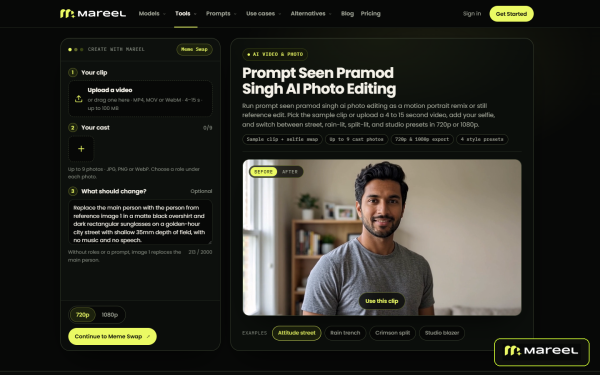
Static image workflows often split between basic filter apps that flatten facial detail and complex node setups that require local GPU hardware. Mareel combines curated style templates with prompt-based photo editing in a standard web browser, supporting up to 16 reference images on compatible models and output resolutions up to 4K.
Creators following viral social portrait trends can run motion portrait remixes or still edits across street, rain-lit, and studio presets with the Prompt Seen Pramod Singh AI photo editing tool. For casting and character timelines, AI age progression previews younger and older versions of a subject while preserving bone structure and identity.
Broader restyling and talent swaps run in the same studio. Users transform existing photos into new lighting, materials, or art styles using the image-to-image workflow, or replace faces across campaign stills with matched lighting in photo face swap.
When source files need technical cleanup or layout changes before publishing, teams recover crisp edge and texture detail with the image sharpener and handle object edits, background swaps, or outfit changes inside the AI image editor. Saved characters and product kits stay in the workspace Library so users can carry the same face or item straight into video production.
Before any image job starts, Mareel checks the selected model’s supported aspect ratios and reference limits and shows the exact credit cost on the Generate button.
“A strong visual campaign usually starts with getting the still image right,” said a spokesperson for Mareel. “Whether a creator is testing a viral portrait prompt, aging a character for a storyboard, or sharpening catalog shots, keeping those image tools next to our video studios saves constant file exports.”
Mareel runs on desktop web browsers at https://mareel.ai/. Eligible new accounts receive one-time sign-up credits, and paid plans start at $15 per month.
About Mareel
Developed by Rockbase Global Limited, Mareel is an all-in-one AI creative platform that brings leading image and video models into one workspace. Through AI Image, AI Video, AI Avatar, Ad Studio, Canvas, and Marketing Lab, teams produce and manage visual assets from one credit balance.
Media Contact
Organization: Mareel
Contact Person: Mareel Media Team
Website: https://mareel.ai/
Email: Send Email
City: Los Angeles
State: California
Country: United States
Release id: 50754
View source version on King Newswire:
Mareel Expands AI Portrait Restyling, Age Progression, and Photo Editing Tools
About Author
Disclaimer: The views, suggestions, and opinions expressed here are the sole responsibility of the experts. No Digi Observer journalist was involved in the writing and production of this article.
What’s On Melbourne Launches Guide to Events, Dining and Shopping in Central Melbourne
Catina S. Hancock Releases Good Humans, Grown, a Parenting Field Guide
Mareel Connects Storyboard Video, Anime Generation, and Ad Remix in One Studio
Benzinga Money Article Discusses How to Become Part of the 12% of Retirees Who Have Achieved the Recommended $550,000 Minimum Retirement Savings Threshold
Apu Apustaja Conquers New York with Lively Street Ads, Including Times Square Billboard
Bay Smokes Maintains Quality Amid Legislative Changes in the Hemp Industry


-
Press Release4 days ago
Midwest Ragdolls Explains Why Playful Kitten Biting Is Often Misunderstood
-
Press Release4 days ago
ARCPE Holding, LLC Highlights the Importance of Understanding Local Real Estate Market Conditions
-
Press Release3 days ago
Red Banyan CEO Evan Nierman Leads High-Stakes Communications Workshop at NASDDDS Annual Conference
-
Press Release2 days ago
IntelliVIX Wins Two CES 2027 Innovation Awards, Showcasing Global Competitiveness in Safety AI
-
Press Release7 days ago
Altegio Announces Open Platform Connecting Beauty and Wellness Businesses With AI Agents at Web Summit 2026
-
Press Release4 days ago
Dasher Personalized Running Highlights Personalized Half Marathon Training Plans Focused on Injury Prevention and Sustainable Progress
-
Press Release2 days ago
Rifstone Capital LLC Advances Institutional Research Platform with Expanded Global Allocation Framework
-
Press Release5 days ago
Rantizo (Nasdaq: RNTZ) Advances U.S. Production of Heavy-Lift Autonomous Drones After $258.8 Million Acquisition, Targets California’s $61.2 Billion Agricultural Market