
Press Release
Why Your QuickBooks File Suddenly Became Slow — and What You Can Do About It

Brandon, MB, Sep 03, 2026, ZEX PR WIRE — A slow QuickBooks file can turn routine accounting tasks into a daily frustration. Reports take longer to generate, transactions save slowly, and users may experience freezing or unexpected delays. While many businesses assume the problem is simply an aging computer, the real cause is often the QuickBooks company file itself.
One of the most common reasons for poor performance is an oversized company file. As years of invoices, payments, payroll records, inventory transactions, and attachments accumulate, QuickBooks must process increasingly large volumes of data. Over time, this can significantly impact speed and responsiveness.
Network latency is another frequent culprit, especially in remote and hybrid work environments. If users access QuickBooks through a VPN, hosted environment, or shared network, connection delays can slow data transfers and make routine tasks feel sluggish. Even minor network issues can have a noticeable effect on performance.
File fragmentation and database inconsistencies can also contribute to slowdowns. As a company file grows and changes over time, its internal structure can become less efficient. This may result in longer search times, delayed report generation, and occasional errors.
The QuickBooks Rebuild Data utility can sometimes help resolve minor database issues and improve performance. If Verify Data identifies errors, rebuilding the file may restore efficiency and prevent more serious problems from developing. However, recurring errors often indicate deeper corruption that requires professional attention.
Finally, hosting misconfigurations remain a major source of performance complaints. Underpowered servers, unreliable storage systems, or improperly configured multi-user environments can create bottlenecks that affect every user connected to the file.
The good news is that a slow QuickBooks file is often a warning sign rather than a permanent problem. By addressing file size issues, optimizing hosting environments, resolving network bottlenecks, and checking for database errors, businesses can frequently restore performance before productivity and data integrity are impacted.
As QuickBooks data specialists, we often find that early intervention not only improves speed but also helps prevent the corruption and downtime that commonly follow prolonged performance issues.
About QuickBooksUsers.com
QuickBooksUsers.com is backed by the team at E-Tech Corporation, a company that has specialized exclusively in QuickBooks data services since 1999. Over more than two and a half decades, we’ve repaired, converted, and migrated tens of thousands of QuickBooks files for businesses of every size — from sole proprietors to enterprises with complex multi-entity setups.
What started as a focused QuickBooks file repair service has grown into a comprehensive operation covering 36 distinct services. We handle everything from emergency data recovery to complex platform migrations, file optimization, and regional conversions. Our clients include accounting firms, bookkeepers, IT consultants, and businesses across the United States, Canada, the United Kingdom, and Australia.
We’ve worked with every version of QuickBooks ever released — from the earliest DOS editions through the latest Desktop and Enterprise versions. That depth of experience means we’ve seen virtually every type of file issue, error code, and conversion challenge that exists. When you bring us a problem, chances are we’ve solved it before.
About Author

Disclaimer: The views, suggestions, and opinions expressed here are the sole responsibility of the experts. No Digi Observer journalist was involved in the writing and production of this article.

Press Release
Karviva and Founder Dr. Angela Zeng Featured in 2026 USA TODAY Food as Medicine Edition.
Full-page feature highlights founder Dr. Angela Zeng’s approach to combining traditional wellness principles with modern nutrition
Saint Louis, MO, United States, 17th Oct 2026 – Karviva, the functional beverage company founded by Dr. Angela Zeng, is featured in the 2026 USA TODAY Food as Medicine special edition, with a full-page feature appearing on page 23 in both the digital and print editions. According to information provided by USA TODAY, approximately 250,000 printed copies of the special edition are expected to be in circulation. The feature highlights Dr. Zeng’s background as a medical scientist, her family’s generations-long connection to Traditional Chinese Medicine, and the thinking behind Karviva’s whole-plant beverage portfolio.

The feature, titled “Why a Medical Scientist Built a Gentler Cleanse,” explores Dr. Zeng’s personal and professional path and the ideas that led her to create Karviva. It highlights the company’s use of whole-plant ingredients, including fruits, vegetables, sprouts, herbs, and botanicals, as well as its approach to developing juice products without added sugar or harsh laxatives.
Dr. Zeng founded Karviva after combining her scientific training with the traditional wellness practices she grew up around. Her background includes a Ph.D. in Pathology and training in evidence-based nutrition, while her family history introduced her to Traditional Chinese Medicine from an early age.
“A cleanse should not feel like a punishment,” said Dr. Angela Zeng. “It should give you space to hydrate, simplify your meals, and pay attention to what your body needs.”
The USA TODAY appearance adds to a series of recent milestones for Dr. Zeng and Karviva. Dr. Zeng’s debut book, The Balance Cure: The TCM Way to Lasting Weight Loss, has reached the No. 1 bestseller position in Amazon’s Holistic Medicine category. The book explores Traditional Chinese Medicine alongside modern nutrition and introduces readers to five TCM body patterns, self-assessments, seasonal observations, recipes, and lifestyle reflections.
Karviva has also recently received recognition from Good Housekeeping, with the company’s Profit Cacao Whole Plant Protein & Prebiotic Smoothie selected as a winner of the 2026 Snack Awards. The recognition followed evaluations by the Good Housekeeping Institute Nutrition Lab and consumer testing as part of the award program.
The new USA TODAY feature offers readers a closer look at the founder behind Karviva and the ideas that continue to shape the company’s approach to functional beverages.
About Dr. Angela Zeng
Dr. Angela Zeng, Ph.D., MBA, is a food scientist, Traditional Chinese Medicine scholar, and founder and CEO of Karviva. Born into generations of Chinese herbal practitioners and trained in pathology, biochemistry, and evidence-based nutrition, she combines traditional wellness principles with modern nutritional science through her work as an entrepreneur, author, and speaker. She is the author of The Balance Cure: The TCM Way to Lasting Weight Loss.
About Karviva
Karviva is a St. Louis-based functional beverage company founded by Dr. Angela Zeng. Inspired by Traditional Chinese Medicine and modern nutritional science, the company develops plant-based beverages using whole-food ingredients, botanicals, and prebiotic fiber. Its portfolio includes juices, protein smoothies, hydration beverages, and other functional drinks.
Media Contact
Organization: Karviva
Contact Person: Dr. Angela Zeng
Website: https://karviva.com/
Email:
angela@karviva.com
City: Saint Louis
State: MO
Country: United States
Release id: 49986
View source version on King Newswire:
Karviva and Founder Dr. Angela Zeng Featured in 2026 USA TODAY Food as Medicine Edition.
About Author
Disclaimer: The views, suggestions, and opinions expressed here are the sole responsibility of the experts. No Digi Observer journalist was involved in the writing and production of this article.
Financial technology company opens its app in more than 50 countries during FLOW Summit as 500-plus builders develop AI and Web3 products
BANGKOK, Oct. 17, 2026, ZEX PR WIRE — U-topia, a financial technology company building a self-custody app for everyday money movement, has opened its public beta in more than 50 countries. The company announced the launch at FLOW Summit 2026, held Oct. 15-16 at Avani Sukhumvit Bangkok, five years after U-topia was founded.

More than 700 people attended the two-day launch, including technology entrepreneurs, developers and community members from several countries. The program combined U-topia product demonstrations and company updates with U-Hackathon, a global build program focused on practical AI and Web3 products.
“Five years ago, I set a simple standard: if my mother could not use the product without calling me for help, it was not ready,” said Emmanuel Quezada, founder and CEO of U-topia. “Opening the beta with people from around the world, while hundreds of builders were creating new tools beside us, brought that idea to life. Our goal is to make moving money as simple as sending a message while keeping people in control.”
A public beta designed around everyday use
U-topia is designed to let eligible users hold, send, spend, convert and withdraw digital and everyday currencies through one mobile app. Users can send funds to another U-topia user through a U-Tag, a simple @name that replaces a long wallet address. The company says funds remain under the user’s control rather than being held by U-topia.
The public beta follows private alpha and closed beta testing with community members and ambassadors. Feature availability varies by country. Account opening, card issuance and transactions remain subject to age requirements, identity verification, partner rules and local law. U-topia is not a bank or card issuer; card and local currency services are provided through licensed partners where available.
U-Hackathon brings global builders to Bangkok
FLOW Summit also hosted U-Hackathon on Oct. 15-16. Organizers said the event attracted more than 500 hackers and builders from around the world. Teams worked through a 24-hour build period with product, engineering and design mentors before presenting working prototypes in two tracks: artificial intelligence and Web3. The program extended the app launch into a working forum for new products, technical collaboration and international builder participation.
The competition recognized three teams in each track. Organizers valued the combined awards at more than 2.5 million Thai baht, including the advertised THB 1 million core prize pool, partner bounties and technology credits. UBotPay, an AI-powered payment agent built for Web3, won first place in the Web3 track. U-Reach, an AI-powered marketing, sales and customer relationship management platform, took first place in the AI track.
U-Hackathon was sponsored by ElevenLabs, Tokenomist AI and DTC Group, in association with Avalanche, Team1 Thailand, Yellow.com, ContributionDAO, CUBS Chula and Hooray. Judges selected projects on merit, and members of the U-Center DAO community voted live for the grand prize.
The summit also included a preview of U.bot, a related AI venture from members of U-topia’s founding team. U.bot is being developed as a user-controlled orchestration layer that can select among AI models and coordinate specialized agents. Its long-term roadmap aims to create a more capable personal AI experience with characteristics the team associates with superintelligence; those advanced capabilities are planned and are not currently available.
About U-topia
Founded on Oct. 16, 2021, U-topia is a financial technology company building a self-custody mobile app intended to help people hold, send, spend, convert and withdraw digital and everyday currencies while retaining control of their funds. U-topia is not a bank and does not issue cards. Availability and features vary by country and are subject to partner requirements and local law. Learn more at www.u-topia.com.
About Author
Disclaimer: The views, suggestions, and opinions expressed here are the sole responsibility of the experts. No Digi Observer journalist was involved in the writing and production of this article.
Press Release
From Karmayogi to the World Stage: Dr. Hemant Garg Wins “Excellence in AI for Public Policy”, Charts India’s Path to the AI Big League
Civil servant, researcher and AI pioneer tells the 3rd World AI Summit, Bengaluru, that people-first, sovereign AI can make India a global AI leader
Bengaluru, India, 16th October 2026, ZEX PR WIRE — Dr. Hemant Garg, Deputy Director (Legal), Employees’ State Insurance Corporation (ESIC), Ministry of Labour and Employment, Government of India, received the “Excellence in AI for Public Policy” award at the 3rd World AI Summit in Bengaluru on 14–15 October 2026, placing an Indian public-policy voice at the centre of the global debate on how AI should serve people.
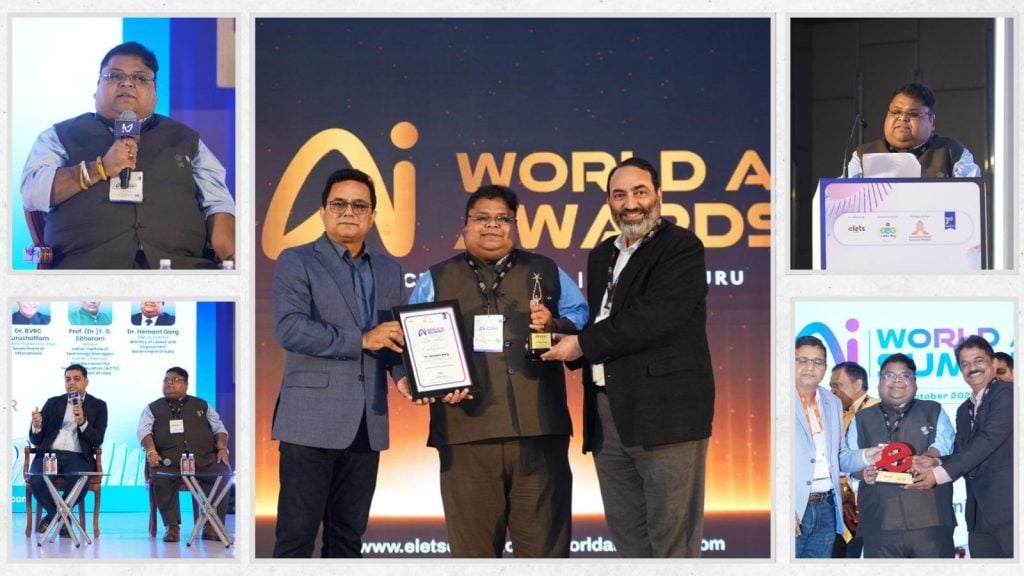
Dr. Garg described all of his work, from AI agents for government to AI-led labour law outreach, as an effort to help realise Hon’ble Prime Minister Shri Narendra Modi’s vision of Viksit Bharat@2047, under the leadership of Hon’ble Union Labour and Employment Minister Dr. Mansukh Mandaviya, whose Shramev Jayate reforms, Labour Codes and Ease of Doing Business drive set the direction. The goal, he said, is an Atmanirbhar Bharat in AI, built on a Bharat AI Stack: Indian large language models such as Sarvam, the Bhashini platform serving citizens in their own languages, and home-grown agents and talent under the IndiaAI Mission, taking India into the global AI league.
Held with Digital India, the National e-Governance Division (NeGD) and the Karnataka Digital Economy Mission (KDEM) as partners in Bengaluru, India’s startup, IT and now AI capital, often called India’s Silicon Valley, the Summit was themed “AI for All: Accelerating India’s Journey Towards Inclusive, Responsible and Future-Ready AI”.
The award honours his creation in 2023 of “IFSCA Karmayogi”, the first AI agent at the International Financial Services Centres Authority (IFSCA), GIFT City, and his research on AI in anti-money laundering, the Labour Codes and algorithmic management of gig workers.
On the panel “AI for All – India’s Journey to a Sovereign, Inclusive AI Future”, with Shri Aman Mittal, IAS, Dr. BVRC Purushottam, IAS and Prof. (Dr.) T. G. Sitharam, former Chairman, AICTE, moderated by Dr. Ravi Gupta, Dr. Garg said inclusive AI must include the worker, and that India can blend Europe’s rights-based approach, US-style audits and Singapore’s skilling model through its Labour Codes, the DPDP Act and e-Shram.
His keynote, “AI, Employment & Skills: Building a Future-Ready Workforce for India”, presented as “From Files to Foresight”, began with a worker disabled in an accident, or a family that has lost its breadwinner, whose care and pensions depend on ESIC, EPFO, the Ministry of Labour and Employment and the National Health Authority. “The true test of AI in government is how quickly that family receives its benefits, and whether it is treated with dignity on the way,” he said.
He traced three waves of governance: e-Governance, which put paper online; Digital Governance, built on India’s digital public infrastructure; and now AI-enabled Intelligent Governance, where benefits reach eligible citizens without their having to apply.
Dr. Garg propounded that AI will change tasks first, then jobs, then institutions and the workforce, and called for institutions for AI governance, impact assessment and exposure mapping to curb job attrition, support reskilling and compensate workers in transition. e-Shram, ESIC and EPFO, now reaching gig and platform workers, can extend social security to those left out, while indigenous models such as Sarvam and Bhashini can grow home-grown AI talent under the IndiaAI Mission.
Government AI, he said, must be lawful, explainable and accountable; “a pattern is not proof”; and India must guard against a new colonisation “not by ships, but by servers”. He proposed “Five Ts”: Trust, Transparency, Talent, Thin and safe data, and Tested-then-scaled.
An LLB, LLM and Ph.D., and an IIT Delhi CTO Programme alumnus with nearly two decades in public service, including Punjab’s Department of Cooperation, Dr. Garg has researched digital governance in governments and cooperatives extensively; his work is published internationally, taught in universities and presented at Oxford, Harvard and Cambridge.
“Not artificial intelligence replacing governance, but intelligent governance that remains deeply human,” he concluded.
Connect with Dr. Hemant Garg on LinkedIn: https://in.linkedin.com/in/dr-hemant-garg-2b26699
About Author
Disclaimer: The views, suggestions, and opinions expressed here are the sole responsibility of the experts. No Digi Observer journalist was involved in the writing and production of this article.
Karviva and Founder Dr. Angela Zeng Featured in 2026 USA TODAY Food as Medicine Edition.
U-topia Launches Public Beta as Global Builders Gather for U-Hackathon
From Karmayogi to the World Stage: Dr. Hemant Garg Wins “Excellence in AI for Public Policy”, Charts India’s Path to the AI Big League
Benzinga Money Article Discusses How to Become Part of the 12% of Retirees Who Have Achieved the Recommended $550,000 Minimum Retirement Savings Threshold
Apu Apustaja Conquers New York with Lively Street Ads, Including Times Square Billboard
Bay Smokes Maintains Quality Amid Legislative Changes in the Hemp Industry


-
Press Release2 days ago
Midwest Ragdolls Highlights Why a Kitten’s Early Environment Matters
-
Press Release4 days ago
INmune Bio Inc. and Quantum Computing Inc. Partner to Apply Quantum Optimization and AI to Advance Alzheimer’s Drug Research and Explore New Applications for XPro
-
Press Release3 days ago
Exhibit at CES 2027: Showcasing GENCHI, the Immersive Avatar Service Called Crazy by a U.S. Angel Investor
-
Press Release6 days ago
Beyond the Customs Declaration: Gorian Aduanas Takes a Specialist, Bespoke Approach to Customs Clearance and Complex International Imports
-
Press Release1 day ago
From Karmayogi to the World Stage: Dr. Hemant Garg Wins “Excellence in AI for Public Policy”, Charts India’s Path to the AI Big League
-
Press Release4 days ago
Evolution Metals & Technologies Corp. Reaffirms $400 Million to $460 Million FY2027 Revenue Guidance, Unveils Eight Sintered Magnet Grades Covering an Estimated 75% of Global NdFeB Revenue, and Moves to Answer U.S. Army Call for Rare Earth Magnets
-
Press Release7 days ago
DATA Network joins Sui and Walrus to scale the supply chain for AI training data
-
Press Release1 day ago
Karviva and Founder Dr. Angela Zeng Featured in 2026 USA TODAY Food as Medicine Edition.