
Press Release
Thunder Token listed on Uniswap V3, ThunderCore launching IXO


Thunder Token (TT) and the trading pairs TT/ETH and TT/USDT are now listed on Uniswap V3 following the decentralized exchange’s (DEX) official launch on May 5th. Now, TT can be exchanged on 3 DEXes: TTSwap, PancakeSwap, and Uniswap thanks to the cross-chain mechanism provided by ThunderCore Bridge. Due to this, TT’s utility and accessibility have increased once again, paving the way for ThunderCore’s upcoming cross-chain yield farming services and IXO.
For TT’s info on Uniswap, visit here.
Trading pair info:
As one of the leaders in the DeFi space, Uniswap has impressive transaction volumes, amount of active users, numbers of smart contracts deployed, liquidity, etc. The V3 update also introduces several functional innovations that further increase the efficiency and scope of ThunderCore’s highly anticipated cross-chain yield farming services. With the benefits these features pose, Uniswap V3 naturally became the first platform for ThunderCore’s IXO.
Cross-chain yield farming, A brand new token, and IXO
Usually, when you yield farm, it is done within a blockchain and its ecosystem. Not anymore. In just a few weeks, ThunderCore will roll out cross-chain yield farming services with Ethereum. Users who participate in these services will receive a brand new token named TORO. This new token is the equity token proving you are a LP taking part in ThunderCore’s cross-chain yield farming with Ethereum. If you provide liquidity for the following pairs on Uniswap V3, you will receive it:
- TT <> ETH
- TT <> USDT
- USDT <> ETH
- USDC <> ETH
- WBTC <> ETH
The best part is, TORO has utility in various DeFi applications such as Uniswap V3, TTSwap, and ThunderCore Bridge. For example, you can use it to provide liquidity with TT on TTSwap to mine more of its own kind. The holder of TORO also gains governance rights over a variety of subjects such as rewards rights, participation rights, voting rights, and more. A governance rights example is earning a proportion of TTSwap’s total transaction volume.
The accumulation of TORO also allows you to participate in ThunderCore’s IXO (initial cross-chain yield-farming offering), an avant-garde and never-before-seen initial offering solution in the blockchain/crypto industry. By staking TORO along with TT in the IXO, you can claim new tokens from other promising protocols and get your original invested amount back instantaneously!
There are numerous DApps on ThunderCore aiming to release their own tokens and IXO is the perfect platform for users to get access to them. This is a great opportunity for users to claim new tokens not yet available in the market with low entry costs.
A significant difference between TORO and other tokens derived from yield farming (e.g. CAKE) is that this token is a cross-chain asset. It has utility on Ethereum, Binance Smart Chain, and ThunderCore, making it truly one of a kind.
Of course, TORO will be integrated into the ThunderCore ecosystem so users can experience rich DeFi DApps such as trading, staking, borrowing, and lending; this is just the beginning.
About Author

Disclaimer: The views, suggestions, and opinions expressed here are the sole responsibility of the experts. No Digi Observer journalist was involved in the writing and production of this article.

Press Release
Stellar Furniture Showcases Innovations at ORGATEC 2026, Strengthening Its Global Industry Presence

Stellar Global presented its latest office furniture range at ORGATEC Cologne 2026, held from 27th to 30th October at Koelnmesse Exhibition Centre, Germany. The showcase brought its contemporary office chair and desk designs to an international industry platform, while creating opportunities to connect with buyers, discuss commercial project requirements and explore potential business collaborations.
Foshan, Guangdong, China, 7th Nov 2026 – Stellar Global participated in ORGATEC Cologne 2026, one of the leading international exhibitions for modern office and workspace environments. At Hall 8, Stand A48, the company presented its latest furniture designs, reflecting its focus on creating products suited to the practical demands of contemporary workplaces.
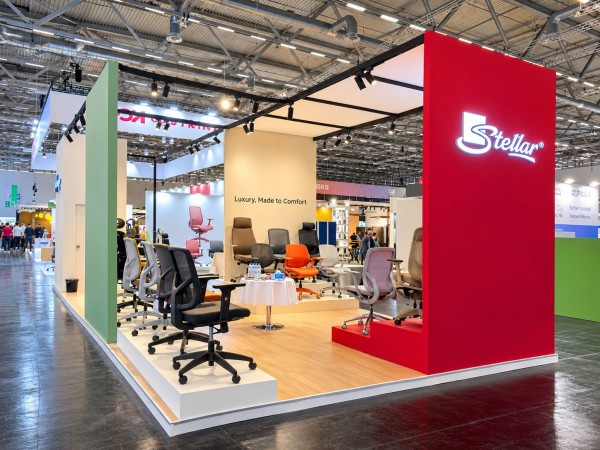
The display featured a selection of office chairs and desks developed around key considerations such as user comfort, ergonomics and structural functionality. With workplace needs continuing to evolve, furniture must serve more than a visual purpose; it must also support everyday use, offer practical value and work effectively within different office settings. These considerations informed the range presented by Stellar Global at the exhibition.
The event also offered an opportunity to take these product conversations beyond the exhibition floor. Stellar Global’s team met with international buyers, business partners and industry professionals, discussing commercial office projects, customised requirements and possible applications across different workplace settings. Dedicated booth walkthroughs allowed visitors to explore the displayed range and discuss their specific project needs directly with the team.
For Stellar Global, participation at ORGATEC was also an opportunity to gain a closer understanding of changing industry expectations and engage with professionals shaping the future of office environments. Such interactions are valuable in informing product development, identifying emerging requirements and building business relationships across markets.
Speaking about the experience, Mr. Arihant Nahar, CEO, Stellar Global, said, “It was encouraging to meet people from across the industry and have meaningful conversations about what today’s workplaces need. ORGATEC gave us the opportunity to present our latest designs, hear different perspectives and discuss how our products can serve a range of commercial projects. We look forward to building on these conversations beyond the exhibition.”
Stellar Global’s participation at ORGATEC Cologne 2026 reflects its continued engagement with the international office furniture market. The company remains focused on developing its product portfolio, understanding the needs of evolving workplaces and building relationships with industry stakeholders across markets.
Media Contact
Organization: Stellar Furniture
Contact Person: Avil Porwal
Website: https://www.stellarglobal.com/
Email: Send Email
Contact Number: +919109316533
Address: Henan Road, South District of Longcong Industrial Zones,
Address 2: Beijiao Town, Shunde,
City: Foshan
State: Guangdong
Country: China
Release id: 50555
View source version on King Newswire:
Stellar Furniture Showcases Innovations at ORGATEC 2026, Strengthening Its Global Industry Presence
About Author

Disclaimer: The views, suggestions, and opinions expressed here are the sole responsibility of the experts. No Digi Observer journalist was involved in the writing and production of this article.
Personal documents, financial information, passwords, memories and personal wishes, kept in one secure place and passed on when it matters
Dubai, UAE, November 7th, 2026, ZEX PR WIRE, Soult held its UAE launch on 2 November 2026 at Madinat Jumeirah, Dubai, bringing its secure digital life vault to families across the Emirates. The app is available on the App Store and Google Play.
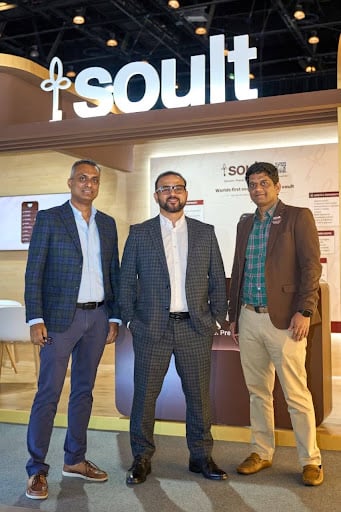
Soult keeps the information a family needs when something happens to the person who manages it: ID and KYC documents, property and investment records, insurance policies, passwords, nominee details, medical wishes, photographs and personal messages.
What sets it apart from document storage is the handover. Users name nominees and executors in advance and decide exactly what each person can see. Soult releases only what the user chose, to the people they chose.
The UAE is a natural market for Soult. Many residents are expatriates whose documents, bank accounts and property sit in more than one country, which makes it harder for families to find and claim what is theirs.
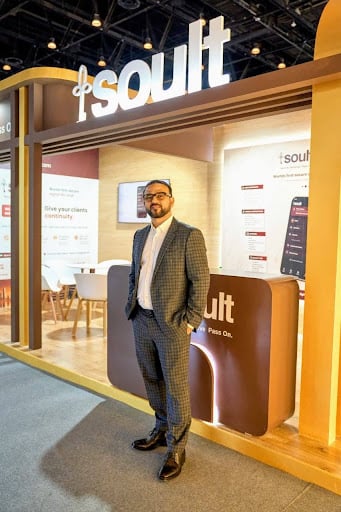
“Families here often live a life split across countries: a house in their home country, an account in Dubai, a policy nobody else knows about,” said Mohammed Saleem, co-founder and CEO of Soult. “Soult makes sure the people you love can find all of it when it matters most.”
Data is encrypted at rest with AES-256 and in transit, with keys managed through AWS KMS. Soult is ISO 27001 and ISO 9001 certified, and no one at Soult, including support staff and administrators, can read a user’s vault.
Soult – World’s first secure digital life vault.
Secure. Preserve. Pass On.
Website: www.soultdigital.com
About Author
Disclaimer: The views, suggestions, and opinions expressed here are the sole responsibility of the experts. No Digi Observer journalist was involved in the writing and production of this article.
Press Release
Create a Lasting Legacy Ferdinand J. Ruano Arroyo’s Newly Released Book Helps Everyday Investors Build Long-Term Wealth
LEXINGTON, KENTUCKY, 7th Nov 2026 – Financial strategist and seasoned entrepreneur Ferdinand J. Ruano Arroyo, MBA, RIA, has released his book, Create Your Own Endowment: How to Build Generational Wealth Like Harvard, Yale, and Princeton. The book is a valuable educational resource for American citizens from all walks of life who want to turn their assets into lasting wealth. It offers a comprehensive roadmap for investing like Ivy League institutions.

Create Your Own Endowment goes beyond short-term solutions, offering a comprehensive blueprint for growing and protecting generational wealth. It connects institutional portfolio strategies with the everyday financial decisions most Americans make, from property and taxes to investments and legacy planning. By examining the endowment strategies of Ivy League institutions and major universities, it equips readers with the knowledge and tools to make informed personal wealth management decisions. Drawing on more than four decades of professional experience, the author presents a framework that integrates portfolio construction, real estate investment, financial planning, and estate planning. Ultimately, the book helps readers incorporate principles such as diversification and disciplined financial management into their personal strategies.
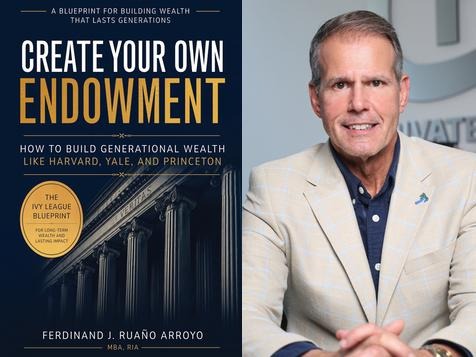
Ferdinand J. Ruano Arroyo, MBA, RIA, is a respected financial professional, entrepreneur, and real estate developer deeply committed to helping people achieve long-term financial security and independence. With more than 40 years in the financial services industry, he is known for developing investment solutions that stand the test of time in any market and for a strong focus on growing and protecting wealth. In addition to his work with high-profile organizations, he serves as the chief executive officer of Private Equity Solutions LLC.
After earning a bachelor’s degree in finance from the University of South Florida and an MBA from Loyola University New Orleans, he helps people stay informed as a host on the El Juego Financiero—Special Edition program. He has also worked to create alternative pathways for aspiring homeowners who may face barriers to traditional financing.
Ferdinand J. Ruano Arroyo is available for interviews.
Title: Create Your Own Endowment: How to Build Generational Wealth Like
Harvard, Yale, and Princeton
Author: Ferdinand J. Ruano Arroyo, MBA, RIA
Contact: Michael DeLon
Company: Paperback Expert
Email: press@PaperbackExpert.com
Phone Number: (501) 404-8690
About Ferdinand J. Ruano Arroyo: https://www.peseasysolutions.net/team-pes
Availability: Amazon.com
Book Preview: https://www.amazon.com/dp/B0HNMPLVXP
Media Contact
Organization: Paperback Expert
Contact Person: Michael DeLon
Website: https://paperbackexpert.com/
Email: Send Email
Contact Number: +15014048690
Country: United States
Release id: 50551
View source version on King Newswire:
Create a Lasting Legacy Ferdinand J. Ruano Arroyo’s Newly Released Book Helps Everyday Investors Build Long-Term Wealth
About Author
Disclaimer: The views, suggestions, and opinions expressed here are the sole responsibility of the experts. No Digi Observer journalist was involved in the writing and production of this article.
Stellar Furniture Showcases Innovations at ORGATEC 2026, Strengthening Its Global Industry Presence
Soult Introduces the World’s First Secure Digital Life Vault in the UAE
Create a Lasting Legacy Ferdinand J. Ruano Arroyo’s Newly Released Book Helps Everyday Investors Build Long-Term Wealth
Benzinga Money Article Discusses How to Become Part of the 12% of Retirees Who Have Achieved the Recommended $550,000 Minimum Retirement Savings Threshold
Apu Apustaja Conquers New York with Lively Street Ads, Including Times Square Billboard
Bay Smokes Maintains Quality Amid Legislative Changes in the Hemp Industry


-
Press Release1 week ago
A Better Life Through Ai Wheel Mobility Scooter 20 inch Boarding Luggage: Airwheel Smart Carry on hand Luxury Cabin Suitcase Shine at the 140th Canton Fair
-
Press Release7 days ago
Soika Labs Launches Mockingjay Network, an Agentic AI Operating System That Lets Businesses Command Their Own AI Workforce
-
Press Release1 week ago
AIXONA Announces AI-Powered Transaction Optimization and Expansion into European and Canadian Markets
-
Press Release7 days ago
Remittances to Uzbekistan Reach $18.9bn as OSON X Opens a UAE Money App for Central Asians
-
Press Release7 days ago
Dataline Raises $10.6M to Give AI Agents Data They Can Trust
-
Press Release7 days ago
Aussie Vape Trend Scales Wholesale Supply Network Across Australia
-
Press Release1 week ago
Rossi Paola Vargas Daly Connects Public Health Research and Criminal Law
-
Press Release1 week ago
Bonzo Septic Repair and Installation Now Offers Septic Tank Pumping