
Press Release
Lab Grown Diamonds Shine Bright in Liberty, MO: Sustainable Luxury Without Compromise

Lab Grown Diamonds, a pioneer in the field of sustainable luxury, is proud to announce its exquisite collection of diamond jewelry, including rings, earrings, pendants, and bracelets. Each piece in the collection is crafted using man-made diamonds, also known as lab-grown or created diamonds. This innovation ensures that customers can enjoy the beauty and elegance of diamonds without contributing to the environmental and ethical issues associated with traditional diamond mining.
Lab-grown diamonds are chemically, physically, and optically identical to mined diamonds, making them a perfect alternative for conscientious consumers. These diamonds are created in controlled laboratory environments, using advanced technological processes that replicate the conditions under which natural diamonds form in the Earth’s mantle. The result is a diamond that is indistinguishable from its mined counterpart, except for its origin. For more Information https://www.labgrown.com/
“Lab-grown diamonds offer a sustainable choice for those who love diamonds but are concerned about the environmental and human impact of mining,” says Mike Christensen, owner of Lab Grown Diamonds. “Our diamonds are as real as flowers grown in a greenhouse or ice made in a refrigerator. They provide the same sparkle, clarity, and beauty as mined diamonds but without the ethical concerns.”
The collection at Lab Grown Diamonds features a wide variety of jewelry pieces, designed to suit every taste and occasion. Highlights include:
Rings: From timeless solitaires to intricate halo settings, the ring collection showcases the versatility and brilliance of lab-grown diamonds. Each ring is a testament to the brand’s commitment to quality and sustainability.
Earrings: The earrings range features classic studs, elegant drop earrings, and modern designs, all set with dazzling lab-grown diamonds. These pieces are perfect for adding a touch of sparkle to any outfit.
Pendants: The pendants collection includes delicate solitaire pendants, intricate designs, and statement pieces, all showcasing the beauty of lab-grown diamonds. These pendants make a meaningful gift for any occasion.
Bracelets: From tennis bracelets to elegant bangles, the bracelet collection offers a variety of styles to suit every wrist. Each piece is designed to highlight the exceptional quality of lab-grown diamonds.
Lab Grown Diamonds is committed to providing customers with not only beautiful jewelry but also peace of mind. The company’s dedication to sustainability is reflected in every aspect of its business, from the sourcing of materials to the manufacturing process. By choosing lab-grown diamonds, customers can enjoy luxurious, high-quality jewelry while making a positive impact on the planet. For more Information https://www.labgrown.com/.
About

Lab Grown Diamonds, based in Liberty, MO, specializes in creating exquisite diamond jewelry using lab-grown diamonds. The company was founded on the principles of sustainability and ethical responsibility, offering customers a high-quality, eco-friendly alternative to traditional diamond jewelry. With a wide range of rings, earrings, pendants, and bracelets, Lab Grown Diamonds is dedicated to providing beautiful, timeless pieces that are kind to the Earth and its inhabitants.
For media inquiries, please contact:
Mike and Jeravae Christensen
1536 NE 96th St, Liberty, MO, 64068
Media Contact

Name
Lab Grown Diamonds
Contact name
Mike and Jeravae Christensen
City
Liberty
State
MO
Zip
64068
Country
US
Url
https://www.labgrown.com/
COMTEX_453652900/2737/2024-06-11T06:33:48
About Author

Disclaimer: The views, suggestions, and opinions expressed here are the sole responsibility of the experts. No Digi Observer journalist was involved in the writing and production of this article.

Press Release
Create a Lasting Legacy Ferdinand J. Ruano Arroyo’s Newly Released Book Helps Everyday Investors Build Long-Term Wealth
LEXINGTON, KENTUCKY, 7th Nov 2026 – Financial strategist and seasoned entrepreneur Ferdinand J. Ruano Arroyo, MBA, RIA, has released his book, Create Your Own Endowment: How to Build Generational Wealth Like Harvard, Yale, and Princeton. The book is a valuable educational resource for American citizens from all walks of life who want to turn their assets into lasting wealth. It offers a comprehensive roadmap for investing like Ivy League institutions.

Create Your Own Endowment goes beyond short-term solutions, offering a comprehensive blueprint for growing and protecting generational wealth. It connects institutional portfolio strategies with the everyday financial decisions most Americans make, from property and taxes to investments and legacy planning. By examining the endowment strategies of Ivy League institutions and major universities, it equips readers with the knowledge and tools to make informed personal wealth management decisions. Drawing on more than four decades of professional experience, the author presents a framework that integrates portfolio construction, real estate investment, financial planning, and estate planning. Ultimately, the book helps readers incorporate principles such as diversification and disciplined financial management into their personal strategies.
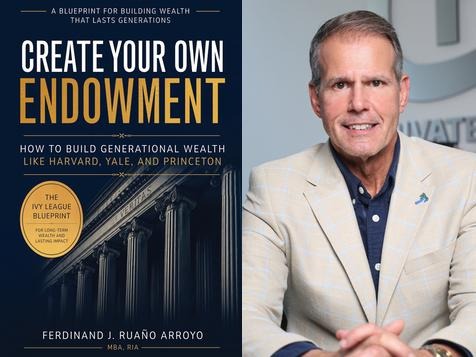
Ferdinand J. Ruano Arroyo, MBA, RIA, is a respected financial professional, entrepreneur, and real estate developer deeply committed to helping people achieve long-term financial security and independence. With more than 40 years in the financial services industry, he is known for developing investment solutions that stand the test of time in any market and for a strong focus on growing and protecting wealth. In addition to his work with high-profile organizations, he serves as the chief executive officer of Private Equity Solutions LLC.
After earning a bachelor’s degree in finance from the University of South Florida and an MBA from Loyola University New Orleans, he helps people stay informed as a host on the El Juego Financiero—Special Edition program. He has also worked to create alternative pathways for aspiring homeowners who may face barriers to traditional financing.
Ferdinand J. Ruano Arroyo is available for interviews.
Title: Create Your Own Endowment: How to Build Generational Wealth Like
Harvard, Yale, and Princeton
Author: Ferdinand J. Ruano Arroyo, MBA, RIA
Contact: Michael DeLon
Company: Paperback Expert
Email: press@PaperbackExpert.com
Phone Number: (501) 404-8690
About Ferdinand J. Ruano Arroyo: https://www.peseasysolutions.net/team-pes
Availability: Amazon.com
Book Preview: https://www.amazon.com/dp/B0HNMPLVXP
Media Contact
Organization: Paperback Expert
Contact Person: Michael DeLon
Website: https://paperbackexpert.com/
Email: Send Email
Contact Number: +15014048690
Country: United States
Release id: 50551
View source version on King Newswire:
Create a Lasting Legacy Ferdinand J. Ruano Arroyo’s Newly Released Book Helps Everyday Investors Build Long-Term Wealth
About Author
Disclaimer: The views, suggestions, and opinions expressed here are the sole responsibility of the experts. No Digi Observer journalist was involved in the writing and production of this article.
The Aveda salon on East Bell Road offers walk-ins, appointments and Sunday hours for holiday parties, family photos and New Year’s Eve
Scottsdale, Arizona, United States, 7th Nov 2026 – With holiday parties, family gatherings and New Year’s Eve celebrations filling calendars, Bon Bon Hair Salon & Spa of Scottsdale is inviting guests to plan their holiday hair and beauty appointments early. The full-service Aveda salon, open since 2018, offers event styling, color, nails, lashes and waxing under one roof, so guests can be ready for every event of the season in one visit.

Holiday services at Bon Bon include:
- Event styling and blowouts for office parties, holiday dinners and New Year’s Eve
- Color refreshes, including root touch-ups, gloss and toner, highlights and balayage, using Aveda color
- Brazilian Blowout smoothing for frizz-free hair through the holiday weeks
- Hair extensions, including clip-ins for a one-night look (hair is ordered after a deposit, so guests should book early)
- Manicures and pedicures with Dazzle Dry non-toxic polish, plus zero gravity pedicures
- Lash lift and tint, brow services and waxing
- Haircuts for the whole family before holiday photos, including kids’ and men’s cuts
“Holidays are when our guests want to look and feel their best, and many of them have been coming to us for years. We give every client professional, personal service and treat them like friends and family, whether they’re getting ready for a party or just want a fresh look for the new year.” said Milana Nerik, owner of Bon Bon Hair Salon & Spa of Scottsdale.
Planning tips for the season
Bon Bon suggests that guests book color services one to two weeks before a big event, and schedule styling and nails within a day or two of it. Hair extensions need extra lead time because the hair is ordered in advance. Mid- to late-December appointments fill up fastest.
Holiday hours and booking
Bon Bon is open Monday through Thursday 8:30 a.m. to 5 p.m., Friday 8:30 a.m. to 4 p.m. and Sunday 8:30 a.m. to 5 p.m. It is closed Saturdays. Walk-ins are welcome, and appointments can be booked online at bonbonofscottsdale.com.
About Bon Bon Hair Salon & Spa of Scottsdale
Bon Bon Hair Salon & Spa of Scottsdale is a full-service Aveda hair salon and spa at 5555 E. Bell Road, Suite 8, Scottsdale, AZ 85254. Since opening in 2018, Bon Bon has offered haircuts, color, extensions, smoothing treatments, nails, lashes and waxing, plus on-site bridal hair and makeup. The salon is known for professional service with a personal touch, and many of its guests have been coming for years. Learn more at bonbonofscottsdale.com.
Media Contact
Organization: Bon Bon Hair Salon of Scottsdale
Contact Person: Milana Nerik
Website: https://bonbonofscottsdale.com/
Email: Send Email
Contact Number: +16027884101
Address: 5555 E Bell Rd #8, Scottsdale, AZ 85254
City: Scottsdale
State: Arizona
Country: United States
Release id: 50547
View source version on King Newswire:
Holiday Party Hair: Bon Bon Hair Salon & Spa of Scottsdale Gets Guests Event-Ready
About Author
Disclaimer: The views, suggestions, and opinions expressed here are the sole responsibility of the experts. No Digi Observer journalist was involved in the writing and production of this article.
Press Release
Author and Publisher George P. A. Dover Launches StorySign, Bringing Personalized Author Autographs to eBooks
United States, 7th Nov 2026 – For as long as books have had covers, getting one signed meant standing in a line at a bookstore, a festival, or a convention hall, hoping the author had five seconds and a working pen. That ritual rewarded proximity over loyalty. A reader across the world who had read every book an author wrote got nothing, while someone who lived near the signing table walked away with a keepsake. StorySign was built to close that gap.
The platform comes from someone who has spent decades on both sides of the signing table. George P. A. Dover is a Guyanese-born author, editor, and publisher with 12 titles listed under his Amazon author profile, spanning fiction, memoir, poetry, and anthology work.
His catalog includes Rockland heart Revisited: A Novel, Shyrah Street: Novellas & Short Stories, Skid Marks Vision: A Novel, Kumakha Warrior Queen, Collected GPAD Poems:1981 to 2023, Mount Roraima High: A Novella and Two Short Stories, The Twin Serpents: Book
One of the Clairborne Series, and Hopping in the Footsteps of Che Guevara: A Memoir, which recounts his years studying in Havana, Cuba. In 2011, he founded OLAI Press, which has published more than a dozen titles, including Berkley Wendell Semple’s Guyana Prize for Literature-winning collection Lamplight Teller. He also teaches in the Language Arts department at Antelope Valley College.
“As an author, I’ve felt how much a signature means to a reader, and as a publisher, I’ve watched digital books quietly take that moment away,” said Dover. “Readers have moved to eBooks, but the relationship between a reader and an author shouldn’t disappear with the paper. StorySign gives that moment back, wherever the reader lives.”
How StorySign Works
The reader journey takes four steps. A reader uploads a PDF of an eBook they already own. They request a personalized autograph from the author, adding a dedication request or a note about what the book meant to them. The author reviews the request and signs by hand, with a finger, stylus, or Apple Pencil, adding a handwritten message alongside the signature. The signed book is then delivered straight into the reader’s private digital library.
Real-time status tracking moves each request visibly from submitted to in progress to completed, so a reader always knows where their book stands. For authors, StorySign turns an unscalable perk of touring into an ongoing part of their relationship with readers. A dashboard lets writers review incoming requests, accept or decline at their own pace, and set their own volume and terms through subscription tiers. A midlist author with a devoted readership can connect with those readers directly, without waiting for a publisher to book a tour stop.
Built by Cobweb Games and Appsters
Dover partnered with Cobweb Games and its app product studio Appsters to develop the platform’s technology, from the signing workflow to the verification layer that confirms each autograph comes from the author.
“The technical challenge was making the whole exchange feel real, well beyond the signature itself,” said Ali, Head of Development at Cobweb Games.“Readers needed to trust that the author actually signed their copy, and authors needed a tool that didn’t turn every fan interaction into admin work. We spent most of our engineering time on verification and the request workflow, because that’s what earns trust on both sides.”
StorySign is available on iOS and Android, with verified author profiles and native in-app payments through Apple and Google. Authors can apply through storysign.org to set up a profile and begin accepting requests.
About StorySign
StorySign is a digital platform founded by author and publisher George P. A. Dover that connects readers with authors through personalized eBook autographs. The platform was developed by Cobweb Games and its product studio Appsters. Learn more at storysign.org.
About OLAI Press
Founded in 2011 by George P. A. Dover, OLAI Press has published more than a dozen titles, including award-winning and short-listed literary works.
Media Contact
Organization: StorySign
Contact Person: Syed Ali
Website: https://storysign.org/
Email: Send Email
Country: United States
Release id: 50450
View source version on King Newswire:
Author and Publisher George P. A. Dover Launches StorySign, Bringing Personalized Author Autographs to eBooks
About Author
Disclaimer: The views, suggestions, and opinions expressed here are the sole responsibility of the experts. No Digi Observer journalist was involved in the writing and production of this article.
Create a Lasting Legacy Ferdinand J. Ruano Arroyo’s Newly Released Book Helps Everyday Investors Build Long-Term Wealth
Holiday Party Hair: Bon Bon Hair Salon & Spa of Scottsdale Gets Guests Event-Ready
KYNCO2 Set for Concurrent Launch on GCex and P2B
Benzinga Money Article Discusses How to Become Part of the 12% of Retirees Who Have Achieved the Recommended $550,000 Minimum Retirement Savings Threshold
Apu Apustaja Conquers New York with Lively Street Ads, Including Times Square Billboard
Bay Smokes Maintains Quality Amid Legislative Changes in the Hemp Industry


-
Press Release7 days ago
A Better Life Through Ai Wheel Mobility Scooter 20 inch Boarding Luggage: Airwheel Smart Carry on hand Luxury Cabin Suitcase Shine at the 140th Canton Fair
-
Press Release7 days ago
Soika Labs Launches Mockingjay Network, an Agentic AI Operating System That Lets Businesses Command Their Own AI Workforce
-
Press Release1 week ago
AIXONA Announces AI-Powered Transaction Optimization and Expansion into European and Canadian Markets
-
Press Release7 days ago
Remittances to Uzbekistan Reach $18.9bn as OSON X Opens a UAE Money App for Central Asians
-
Press Release7 days ago
Dataline Raises $10.6M to Give AI Agents Data They Can Trust
-
Press Release7 days ago
Aussie Vape Trend Scales Wholesale Supply Network Across Australia
-
Press Release1 week ago
Rossi Paola Vargas Daly Connects Public Health Research and Criminal Law
-
Press Release1 week ago
Bonzo Septic Repair and Installation Now Offers Septic Tank Pumping