
Press Release
Behind High Energy Consumption of Blockchain: PoS Consensus Mechanism To Be A Solution

The energy consumption of Blockchain
Recently, Elon Musk, the founder of Tesla, posted on Twitter saying that: Bitcoin can consume too much in mining and transaction process, such excessive fossil fuel consumption will result in negative impacts on the ecosystem. The Ethereum co-founder Vitalik Buterin also noticed the high power consumption problem in Blockchain technology. He presented that Ethereum would change its consensus mechanism from PoW to PoS to reduce the power consumption caused by the mining process in PoW-based technologies like the Bitcoin. From a global view, energy consumption issues are concerned by an increasing number of countries. To urge the efficient power usage, many countries and organizations have set up environmental protection plans, such as the UN’s SDG (Sustainable Development Goals) and the US carbon neutrality, etc.
In this context, the future development of a technology need to consider the sustainable development and environmental friendliness as one of the important metrics and goals. As an emerging technology for privacy protection, Blockchain presents excellent protection capabilities. However, such capabilities rely on the large-scale computing resources and result in a large amount of power consumption. Part of the reasons for such high power consumption are due to the PoW (Proof of Work) consensus mechanism which has high demands on the performance of the Blockchain nodes.
Besides energy consumption, other concerns of the consensus mechanism
The technology of the base layer of the Blockchain has the advantages like anonymous, Immutable, decentralized and so on. To achieve these advantages, Blockchain enhances the privacy and protect the transaction process by increasing the cost of network participation. The core concept of the early-stage PoW consensus mechanism is based on the workload cost. The credibility need to be proved by the cost of a lot of work. In this case, the machines that maintain the ledgers (also referred to as mining nodes) need to continually crack complex math puzzles to obtain Bitcoin as rewards. This computing process not only needs to rely on a large amount of computing resources, but also sacrifices part of the scalability on the Blockchain to ensure safety. When it comes to the boosting growing of transaction volume, this mechanism will not be able to meet high-speed and large-scale processing demands. Based on such limitations of PoW, PoS (Proof of stake) is gaining more and more attention to work as a consensus mechanism with low resource consumption and guaranteed decentralization, safety and scalability.
In a PoS-based Blockchain system, nodes do not have to consume much power to compete for accounting rights. The priority of accounting rights is measured by the amount of stake holdings. In this way, the nodes no longer consume a large amount of electricity to calculate the hash functions, thereby solving the high energy consumption issues in PoW mechanism. In spite of the improved efficiency in PoS, the safety of the mechanism is affected. Therefore, in order to ensure the reliable operation of PoS, the researchers need to develop reliable algorithms from the trade-off among the decentralization, safety and scalability.
Unique advantages of PlatON PoS
With the issues caused by the PoW mechanism has been widely criticized, more and more Blockchain technologies inclined to choose or transit to the PoS-based consensus mechanisms. This results in a boosting growing of the PoS-based Blockchain frameworks in recent years. As the world leader in computing privacy area, PlatON has rooted and researched in privacy computing technologies many years. PlatON’s research and practice in consensus mechanisms are also forward-looking. The PPoS (PlatON PoS) consensus mechanism uses off-chain identity, credit mechanisms and procedural arrangements to provide a scheme to select a number of verification nodes from many participating nodes as fair and randomly as possible. Hence, PPoS can effectively inhibit bribery, collusion, etc., and reduce the consensus cost and improve the system scalability by optimizing technical details. Meanwhile, ensuring the decentralization and scalability, PlatON further enhances the system safety by combining the experiences in computing privacy area. The Alaya network based on PlatON PoS has been operating stably and efficiently for a long time, successfully solving the problem of over-centralization of the system, reducing network communication complexity and message complexity, improving consensus efficiency and the entire Blockchain transaction processing performance. In this case, the safety and liveness of the technology are verified. PlatON has been able to improve its PoS mechanism through its attention to every detail, continuous attempts, active exploration of cutting-edge areas, and forward-looking plans in the future development. Next step, PlatON will continue actively promoting the efficient network operation with high-quality code, providing efficient, high-availability, distributed and sustainable infrastructure applicable for diverse industrial and commercial use cases, and supporting the exchange of data flows in the global world.
References:
1.PlatON has launched the “Rally around the Galaxy” and launched a comprehensive simulation test, https://mp.weixin.qq.com/s/UeIRWj2lKJ7b1umSqU8_yQ
2. [Long Article Explained] What is the Giskard Consensus Mechanism? | Technology Cloud Atlas, https://mp.weixin.qq.com/s/4yHenrGH0E7zzLBuN58BJg
About Author

Disclaimer: The views, suggestions, and opinions expressed here are the sole responsibility of the experts. No Digi Observer journalist was involved in the writing and production of this article.

Press Release
MyPropCapital Introduces Blockchain-Based Transparency System for Trading Evaluations and Trader Rewards

Hong kong, Hong Kong, October 27th, 2026, FinanceWire
MyPropCapital Technology Limited today announced the launch of MyPropCapital, a proprietary trading evaluation platform that records every fee, account rule, pass and reward on Arbitrum One, a public blockchain. From today, traders can buy a one-step evaluation, trade 298 markets from a web terminal or a phone app, and check every part of their deal on a public block explorer, with no login needed.
The launch answers the question prop traders ask most: will the firm keep its word? Instead of asking traders to trust it, MyPropCapital publishes the proof.
“Our goal isn’t to be the first prop firm. It’s to be the right one,” said Noman Iqbal, co-founder of MyPropCapital. “Traders have been told ‘trust us’ for years. We’re launching a firm that hands them the receipt instead.”
The Launches Today
MyPropCapital launches with three commitments that traders can verify for themselves:
- Rules locked on-chain. When an account opens, its full rule set is fixed to it and a fingerprint of those rules is written to the blockchain. The firm can change what it sells later; it cannot change the deal an account already has.
- Rewards paid by smart contract. Rewards come from a company-funded Reward Reserve whose balance is public. The trader signs a request, and the contract sends USDT to the trader’s own wallet. Every transfer is visible the moment it lands.
- Reserve-backed account sizes. Accounts of $5,000, $10,000 and $25,000 are on sale at launch. The $50,000 size opens only once the Reward Reserve holds $100,000, and the $100,000 size only at $250,000.
“Selling a $100,000 account is easy,” said Zeyyan Khan , Marketing Director of MyPropCapital. “Paying one out is the job. We’d rather wait than sell something we can’t stand behind.”
The Evaluation
- One step, no phase two. Reach a 10% profit target inside the limits and the funded account opens automatically, under the same rules. There is no time limit and no minimum number of trading days.
- 80% reward share on funded profit.
- 298 markets across crypto, gold and other commodities, forex, indices and stocks, priced from Hyperliquid’s live order books. Crypto trades 24/7; the rest follow exchange hours.
- Three plans: Classic; Flex, with the lowest profit target; and Light, with no daily loss limit.
- Web terminal and phone app, both with TradingView charts.
All accounts are simulated. Fills are calculated by the firm’s own engine from live prices, and no order is sent to an exchange.
Limits Per Person From Day One
MyPropCapital also launches with limits that protect the Reward Reserve. One verified person can run up to 10 paid evaluations at a time and hold up to 4 funded accounts, or $100,000 of funded capital in total, whichever comes first. A trader who passes while at the limit keeps the pass, and the funded account opens as soon as a slot frees up.
Availability And Pricing
Evaluations are available now at mypropcapital.com, with one-time fees from $43. The $5,000 and $10,000 accounts pay no trading commission. Payment is by card where available, or USDT on Arbitrum One, and the fee is refundable within 14 days if no trade has been placed. A free demo is open to everyone. The service is not available in Hong Kong or other restricted jurisdictions.
How To Check It
- Open arbiscan.io and paste the accounts contract, 0x8EddEE86E29a58b59CeA2215E9FDCfC1B4FAfb23. Its verified source code is under the Contract tab.
- Under Read Contract, call totalFeesCollected, totalPaidOut and accountCount.
- Paste the Reward Reserve, 0x06c105206Fb9a57e7F278dE53673d1F9aABc116f, and open Token Holdings to see the USDT behind every reward.
Every contract and its owner are listed at mypropcapital.com/transparency.
“If we ever break a promise, the chain will show it before we get the chance to explain,” said Noman Iqbal, co-founder of MyPropCapital. “That’s the point of launching this way.”
About MyPropCapital:
MyPropCapital is an on-chain proprietary trading firm operated by MyPropCapital Technology Limited, Hong Kong. Traders take a one-step evaluation on simulated accounts priced from Hyperliquid’s live order books, across crypto, commodities, forex, indices and stocks. Fees, account rules, passes and rewards are recorded on Arbitrum One, so anyone can check them. Rewards are paid from a company-funded Reward Reserve whose balance is public. Learn more at mypropcapital.com.
Disclaimer: MyPropCapital accounts are simulated and no trader capital is deposited or traded on any exchange. Rewards are performance-based payments of company funds, not investment returns. Most traders do not pass an evaluation, and the one-time fee is the most a trader can lose. Nothing in this release is investment, financial or tax advice. The service is not available in Hong Kong or in other restricted jurisdictions; see the Terms at mypropcapital.com.
Video : Introduction to Mypropcapital.
Contact
Media Director
Zeyyan Khan
MyPropCapital Technology Limited
team@mypropcapital.com
About Author

Disclaimer: The views, suggestions, and opinions expressed here are the sole responsibility of the experts. No Digi Observer journalist was involved in the writing and production of this article.
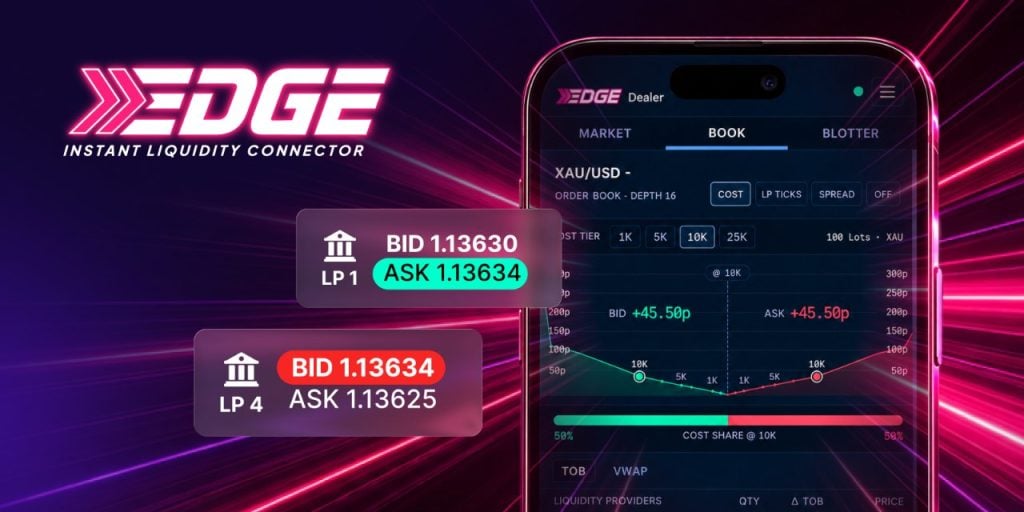
Founder and CEO Tim Furey debuts the EDGE Instant Liquidity Connector — an engine that scans top-tier liquidity in milliseconds, routes raw, unmarked pricing, and passes positive slippage to the client. His message to traders: hope is not a strategy.
They hold your hand. Tim Furey hands you the detonator.
GEORGE TOWN, Cayman Islands — October 27th, 2026 — Tradeview Markets has launched EDGE, the proprietary execution engine its Founder and CEO, Tim Furey, spent years and millions building. His pitch is blunt: most brokers pad spreads and hide costs, and Tradeview won’t. EDGE, he says, is his answer to an industry that has taxed traders for too long.
An engine, not just a platform
Any broker can hand a trader a platform; the engine is what moves the trade. EDGE runs on a proprietary matching engine and proprietary FIX connectivity. It scans multiple top-tier liquidity providers in milliseconds, routes raw, unmarked pricing, slices larger orders surgically, aggregates the fills to the best available price, and adapts in real time when volatility hits. Positive slippage goes to the client — and it all runs inside MT4 and MT5, with nothing to install or relearn.
“I felt it was time to stir things up and give our customers the same rates I am privy to when I trade.”
— Tim Furey, Founder & CEO, Tradeview Markets
Padded spreads aren’t liquidity
Furey has watched traders pay for markup they can’t see for two decades, and in his view every padded pip is a tax on loyalty. Tight headline spreads that vanish when real size lands don’t impress him either: a quote without executable quality, he argues, is a costume. The best price isn’t the number on the screen — it’s what actually fills when the size lands.
“If it doesn’t say .edge, congratulations: you are the liquidity.”
— Tim Furey
Leave the bonus. Take the fill.
Furey is just as direct about bonus-led marketing: traders who come for an offer leave for a better one, while real traders stay for the fill. Tradeview, he says, doesn’t buy balances — it builds clients.
“You don’t win a client with a bribe. You rent a shopper.”
— Tim Furey
Hungry dogs run faster
The attitude has deep roots. A college football mentor gave Furey the line “Hungry dogs run faster,” and he has run on it ever since — from the open-outcry commodity floors to proprietary trading at Schonfeld Securities and forex at ODL Securities, before opening Tradeview in 2004 in a small Wall Street office. Profitable in its first month, the firm today employs nearly 200 staff, holds licensed entities in several jurisdictions, and remains independent and founder-led.
Try it once. Client for life.
Furey is leading Tradeview’s push into the Middle East and its growth across Latin America and Asia, and the pitch is a dare: open a demo, compare the bleed, see live spreads, then decide. The same challenge goes to Tradeview’s introducing brokers — let clients try EDGE once, and retention takes care of itself.
Hope is not a strategy. EDGE is. Demand better at https://www.tradeviewmarkets.com/en/edge/.
About Tim Furey
Tim Furey is the Founder and Chief Executive Officer of Tradeview Markets, a regulated multi-asset broker. He started the firm in 2004 in a small Wall Street office and has grown it into an independent, founder-led global broker with nearly 200 staff. In 2026 he launched the EDGE Instant Liquidity Connector, Tradeview’s proprietary execution engine.
About Tradeview Markets
Founded in 2004, Tradeview Markets is a regulated multi-asset broker offering access to forex, metals, stocks, futures, options and cryptocurrencies for retail and institutional clients, with multi-platform execution. The firm has been founder-led since inception and has grown through organic client acquisition.
For further information, visit https://www.tradeviewmarkets.com.
About Author
Disclaimer: The views, suggestions, and opinions expressed here are the sole responsibility of the experts. No Digi Observer journalist was involved in the writing and production of this article.
CHAPAINAWABGANJ, Bangladesh, October 27, 2026, ZEX PR WIRE — LM Electronics, an online home appliance retailer based in Chapainawabganj, Bangladesh, provides customers with online access to product information about Vision blenders, helping buyers explore available options and consider important factors before purchasing.

Blenders can support a range of everyday kitchen tasks, from preparing smoothies and sauces to grinding ingredients for cooking. Choosing a suitable model involves more than comparing prices. Intended use, motor power, jar capacity, blade design, available functions, product specifications and warranty conditions can all influence a purchasing decision.
Understanding Vision Blender Features
Customers researching a blender should begin by considering how they plan to use the appliance. Those who mainly prepare drinks or blend soft ingredients may have different requirements from households that want to process spices, grains or other harder ingredients. Buyers should check each model’s published specifications and confirm that its stated capabilities match their intended use.
Motor power and jar capacity are useful comparison points, but they should be reviewed alongside the manufacturer’s instructions and the functions listed for the individual model. Customers should also review the included accessories, operating guidance and warranty terms before making a decision.
LM Electronics provides an online destination for customers researching Vision blenders in Bangladesh. Its dedicated brand page allows shoppers to explore listed products and review available product information before choosing an option that suits their kitchen needs.
Comparing Vision Blender Prices and Product Information
Price comparison is an important part of researching kitchen appliances. Customers looking for Vision Blender Price in Bangladesh or Vision Mixer Grinder Price in Bangladesh can visit the LM Electronics website to check currently listed models and review their individual product details.
Prices, specifications and availability may vary between models and can change over time. Customers should therefore consult the current listings before placing an order. Comparing product details alongside price can help buyers make a more informed choice based on their intended use and budget.
Nationwide Delivery and Manufacturer Warranty
Founded in October 2025, LM Electronics operates from Chapainawabganj and delivers household appliances nationwide. Its online business model serves customers beyond major metropolitan centres, including buyers in district and upazila towns who may have limited access to a broad selection of appliances through local retailers.
The company supplies official products carrying manufacturer warranties rather than unofficial or grey-market goods. After-sales service is handled through the respective manufacturer’s service network. Cash on delivery is available, allowing customers to pay when their orders arrive.
Customer support is provided in Bangla and English, both before and after purchase. The company also publishes product specifications and relevant warranty conditions to support more informed purchasing decisions.
About LM Electronics
LM Electronics is an online home appliance retailer founded in October 2025 and based in Chapainawabganj, Bangladesh. It supplies official household appliances with manufacturer warranties and offers nationwide delivery, with cash on delivery available.
Media Contact
LM Electronics
Website: https://lmelectronics.com.bd
Facebook: https://web.facebook.com/lmelectronicsbd
X: https://x.com/lmelectronicsbd
About Author
Disclaimer: The views, suggestions, and opinions expressed here are the sole responsibility of the experts. No Digi Observer journalist was involved in the writing and production of this article.
Tradeview Founder Tim Furey Launches the EDGE Instant Liquidity Connector
MyPropCapital Introduces Blockchain-Based Transparency System for Trading Evaluations and Trader Rewards
HIX AI Unveils Workspace 2.0 for Business Automation
Benzinga Money Article Discusses How to Become Part of the 12% of Retirees Who Have Achieved the Recommended $550,000 Minimum Retirement Savings Threshold
Apu Apustaja Conquers New York with Lively Street Ads, Including Times Square Billboard
Bay Smokes Maintains Quality Amid Legislative Changes in the Hemp Industry


-
Press Release7 days ago
Injective Collaborates with BDACS to Bring Korea’s First Won-Backed Stablecoin to Onchain RWAs
-
Press Release3 days ago
Thomas Berkley of Nexus Acquisition AI Focuses on Turning Business Inquiries Into Structured Growth Opportunities
-
Press Release1 week ago
Mastek Selected by Staffordshire County Council to Drive AI Enabled – Oracle Cloud Transformation
-
Press Release3 days ago
Widgets & Web Launches AI-Operated Investor Relations Websites for Public Companies at a Fixed $299 per Month
-
Press Release3 days ago
Dynamic NameCard Opens Global Franchise Recruitment for Telegram Mini App-Based Digital Identity Services
-
Press Release1 week ago
New Book Where’s the GAP by David P. Matthews, Now Available on Amazon, Asks a Life Changing Question
-
Press Release3 days ago
Thomas Berkley of CSM Collective Explores the Role of Strategic Thinking in Modern Entrepreneurship
-
Press Release1 week ago
PetShopValue.com Highlights Pet Comfort and Travel Essentials Ahead of the Holiday Season