
Press Release
Bank Format Converter Unifies 26 Accounting File Tools Across 8 Formats

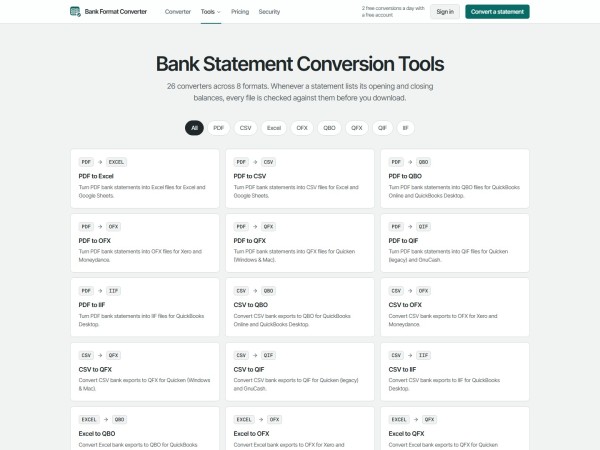
Bank Format Converter provides 26 dedicated converters across PDF, CSV, Excel, OFX, QBO, QFX, QIF, and IIF for QuickBooks, Quicken, Xero, and spreadsheet audits. Features include OFX 1.02 bank ID mapping, automatic balance checks, two free daily downloads, and upfront annual page allowances.
United States, 18th Nov 2026 – Bank Format Converter, which debuted publicly on November 16, 2026, gives accounting teams, bookkeepers, and individual Quicken users 26 specialized conversion tools spanning eight financial file formats. Built to eliminate broken CSV imports and bank feed gaps, the web workspace outputs verified QuickBooks, Quicken, Xero, and Excel files checked against printed statement balances before download.
Importing raw bank data into ledger software breaks in predictable ways. A generic CSV download lacks unique transaction identifiers, so re-importing an overlapping date range duplicates expenses inside QuickBooks Online. Worse, one bank places debits and credits in separate columns while another relies on negative signs, causing imported deposits to post backward as charges. Meanwhile, Quicken frequently rejects standard OFX exports that lack an Intuit bank identifier.
Bank Format Converter groups its 26 converters by the accounting software waiting at the end of the cleanup. Bookkeepers loading historical checking statements into QuickBooks Online or QuickBooks Desktop run PDFs through the PDF to QBO converter or map inconsistent spreadsheet columns through the CSV to QBO converter, confirming detected Date, Description, and Amount fields on screen first. Every QBO and QFX file follows the OFX 1.02 standard with transaction IDs that prevent duplicate imports and a configurable Intuit bank ID (`INTU.BID`, defaulting to 3000 and adjustable under export options when QuickBooks requires a specific bank code). When QuickBooks prompts during Web Connect import, users simply link the feed to their real bank account.
Bridging QuickBooks, Quicken, and spreadsheet audits
Legacy accounting workflows rarely move in just one direction. Alongside Web Connect feeds, QuickBooks Desktop practitioners can produce ready-to-import IIF files directly from PDFs or CSV spreadsheets mapped to their chosen QuickBooks Desktop account name, avoiding hand-written tab-delimited headers.
Quicken users facing rejected generic bank files can convert statements with the PDF to QFX converter or build QIF imports from CSV and PDF records. Accounting firms also run into the opposite problem during audits and tax prep: a client emails closed-period QBO, OFX, or QFX archive files with no readable spreadsheet attached. Reverse tools such as the QBO to Excel converter, QFX to PDF, and OFX to CSV unpack software-only feeds back into clean spreadsheet rows or printable statements for CPA review.
“When a client drops twelve months of mixed PDFs, old QFX downloads, and messy CSV files on your desk before tax deadline, reformatting eats half the afternoon,” a spokesperson for Bank Format Converter said. “Having every major destination format under one balance-checked workspace cuts out the macro headaches.”
Balance verification, browser privacy, and OCR controls
Clean ledger imports depend on spotting extraction mistakes early. Whenever a source PDF or balance-equipped spreadsheet lists starting and ending figures, Bank Format Converter calculates Opening plus Deposits minus Withdrawals against the printed Closing balance and flags any difference right away. Failed conversions never cost pages.
Digital bank exports and text-based PDFs up to 25 MB convert locally inside the browser, never reaching remote servers. Password-protected PDFs unlock directly on the user’s device without transmitting passwords over the network. For scanned paper statements or camera photos, optional server-side OCR starts only after explicit user confirmation on a screen naming both processing partners: Microsoft Azure AI Document Intelligence for text and coordinate extraction, and Anthropic’s Claude for structuring transaction rows. Server processing runs in memory, temporary Azure output triggers immediate deletion, and structured rows return straight to the browser.
Upfront annual allowances built for tax season peaks
Bookkeeping workloads swing hard across the year. Tax filing deadlines, year-end closes, and multi-month client cleanups create sudden volume spikes that punish rigid monthly limits.
Annual plans on Bank Format Converter unlock the full yearly page allowance on day one at half the monthly rate. Starter provides 500 pages monthly at $15 or 6,000 pages upfront for $90 a year, while Professional covers 1,250 monthly pages at $30 or 15,000 pages a year for $180. High-volume practices on Business get 5,000 pages per month at $50 or 60,000 pages upfront for $300 annually, with each page counted as one PDF page or up to 50 rows of CSV, Excel, OFX, QBO, QFX, QIF, or IIF data.
All three paid plans include every converter, OCR support, and mathematical reconciliation checks with zero automatic overage fees, billed through Stripe or Waffo. Upgrading to a larger tier starts a new billing cycle immediately while crediting unused time on the current subscription; downgrades take effect at the next renewal, and users can cancel anytime from Manage billing on their Account page. Before picking a plan, a free registered account with no credit card downloads two files per day at any length, including scanned statements. Exporting the exact same file into both Excel and QBO counts only once via one-way SHA-256 file hashing, failed jobs cost zero pages, and unused paid periods can be refunded within seven days of a charge when zero pages have been spent.
Prospective users should note what the tool leaves out by design. Bank Format Converter does not offer a public API, shared team seats, or unattended bulk folder automation, and unused subscription pages do not roll over after a billing reset. Even when opening and closing totals balance cleanly on a PDF, software-only bank feeds like QBO, QFX, OFX, QIF, and IIF omit printed statement balances for automatic math checking. Automated parsers can also misread dates or descriptions, so preparers review extracted lines before posting into QuickBooks, Quicken, Xero, or tax filings.
About Bank Format Converter
Bank Format Converter is an online financial document conversion workspace supporting PDF, CSV, Excel, OFX, QBO, QFX, QIF, and IIF workflows across 26 specialized converters. Designed for accounting practitioners, business owners, and personal finance users, the platform combines local in-browser processing, explicit OCR disclosures, and automatic balance reconciliation.
Media Contact
Organization: Bank Format Converter
Contact Person: Bank Format Converter Media Relations
Website: https://bankformatconverter.com/
Email: Send Email
Country: United States
Release id: 50863
View source version on King Newswire:
Bank Format Converter Unifies 26 Accounting File Tools Across 8 Formats
About Author

Disclaimer: The views, suggestions, and opinions expressed here are the sole responsibility of the experts. No Digi Observer journalist was involved in the writing and production of this article.

The AI-powered interactive entertainment platform launched on November 6, 2026, lowering barriers to game creation.
Singapore, 19th Nov 2026 – DreamForge officially launched on November 6, 2026. The AI-powered content creation and interactive entertainment platform is designed to help users turn ideas expressed in natural language into playable game experiences, enabling people without traditional programming skills to quickly participate in game creation and share in revenue.
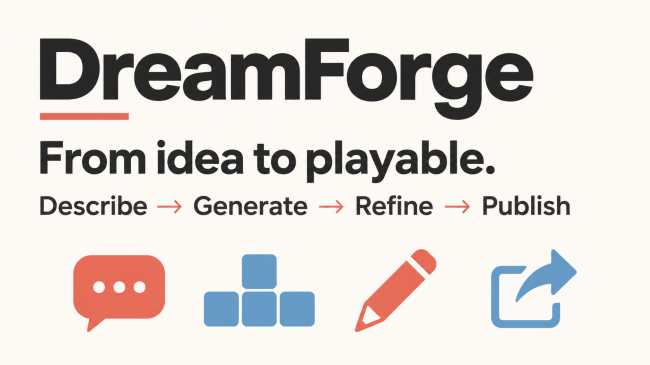
DreamForge’s creation workflow follows five steps: describe an idea, generate an experience, refine it, publish and share it, and earn commissions. Users propose a game concept, AI assists in producing an initial version, and creators continue refining it based on their creative vision and player feedback. By connecting content creation, publishing, and community participation, the platform helps creators reach audiences earlier, test and improve their ideas, and earn ongoing revenue along the way.
The launch marks DreamForge’s transition from development to live operations. Starting with AI-assisted game creation and interactive entertainment, the platform will progressively build its creator ecosystem. It serves independent creators, interest-based communities, and everyday players, enabling them to explore interactive content creation through a gameplay concept, a story, or a shared interest.
For communities built around specific interests, DreamForge also offers a new form of expression. Ideas previously shared through images, videos, or text can become interactive experiences that people can participate in and reshape. Creators can start with a small experience for a clearly defined audience, then assess whether it attracts sustained player engagement.
DreamForge will develop its platform in phases. Initially, it will focus on AI-assisted game generation and interactive entertainment, refining its core creation and publishing workflows. Later plans include expanding supported content types and opening a Skills and Agents repository and APIs, allowing specialized tools, reusable capabilities, and service providers to contribute to the creation process. The platform will also explore creator monetization through virtual goods, professional services, sponsorships, and other channels.
The roadmap also includes a proposed Game Token Launch Platform, intended to explore additional forms of community economic participation for projects that meet predefined criteria. This remains a future initiative; eligibility requirements, rules, and implementation timelines will be announced separately.
About DreamForge
DreamForge is an AI-powered content creation and interactive entertainment platform dedicated to lowering barriers to game creation and connecting creators, players, and communities. It helps turn ideas into interactive experiences people can participate in. Its vision is to transform ideas, trending topics, memes, characters, and more into interactive entertainment worlds that people can play, share, and remix—ultimately building communities around assets of their own.
Media Contact
Organization: DreamForge Foundation LTD.
Contact Person: Mittal Bhavesh
Website: https://dreamforge.fun/
Email: Send Email
Country: Singapore
Release id: 50820
View source version on King Newswire:
DreamForge Launches, Enabling Users to Create Games Through Natural Language
About Author
Disclaimer: The views, suggestions, and opinions expressed here are the sole responsibility of the experts. No Digi Observer journalist was involved in the writing and production of this article.
Sheru Bhai Maker shows creators how to make horizontal 16:9 YouTube clips and vertical 9:16 Instagram Reels from adult selfies and 4K character portraits at sherubhaimaker.com, pairing bilingual lip-sync audio with automatic 24-hour selfie deletion.
United States, 19th Nov 2026 – Sheru Bhai Maker, launched on November 17, 2026, combines an adult selfie transformation editor, 4K character portrait generator, and animation suite for creators making horizontal and vertical lion boss clips. Creators produce talking MP4 episodes formatted directly for YouTube widescreen uploads, YouTube Shorts, Instagram Reels, and TikTok feeds while uploaded personal photos delete automatically within 24 hours.

Turning a still friend portrait or custom artwork into an animated comedy reel usually exposes personal pictures to permanent public websites or forces editors through clunky crop workarounds. Matching palace lobby lighting across two subjects, preserving upright stance alignment, and keeping aspect ratios clean between desktop YouTube players and portrait mobile screens rarely holds together inside free face-swap tools.
Using the Sheru Bhai selfie and photo editor simplifies personalized reel preparation down to one clear portrait upload. Creators toggle between placing a person shoulder-to-shoulder next to the white-suited lion boss in a luxury foyer or transforming that person’s build into Sheru Bhai himself. Lighting cues align automatically across subjects, preparing portraits directly for either vertical social feeds or widescreen video intros.
“Creators wanted a single workspace showing how to make a clean Sheru Bhai reel from a wedding selfie or team portrait without leaving personal snapshots on public galleries,” said a spokesperson for Sheru Bhai Maker. “Running 24-hour automatic selfie deletion alongside one-click animation into horizontal 16:9 or vertical 9:16 clips solves both the workflow bottleneck and privacy hesitation.”
Uploading a consenting adult selfie with 24-hour auto deletion
Clear permission rules govern uploaded images before any file leaves the user’s browser. Before processing a well-lit, front-facing photograph showing clear shoulders, creators check a consent confirmation verifying image ownership and adult permission from every identifiable person shown. Depictions of minors remain banned unless submitted directly by a parent or legal guardian within lawful limits.
Accepted uploads land strictly in private Cloudflare R2 storage buckets isolated from public galleries, search indexes, and AI model training pipelines. Automated lifecycle timers purge source files inside input folders exactly 24 hours after upload. Completed MP4 reels stay private in user accounts for 90 days before automatic deletion.
Automated safety filters check uploaded images and scripts against six strict bans covering explicit sexual content, graphic violence, hate speech, child safety risks, fraudulent impersonation of real individuals, and copyright violations. Hosted output pages carry a “Report this video” button alongside support@sherubhaimaker.com for takedown notices; moderators acknowledge complaints within two business days and manually review flagged assets, inputs, and logs. Account holders also receive 30-day GDPR, UK GDPR, and CCPA data access and removal rights.
Designing 4K character portraits for vertical and widescreen layouts
Editors who skip personal camera uploads still produce full multi-platform visuals inside the AI photo and wallpaper studio. Output framing covers 9:16 smartphone lock screens and Reels covers, 16:9 widescreen frames fit for YouTube video headers and player backgrounds, 1:1 square avatars, and 4:5 Instagram feed cards.
Four signature looks hold accessories intact across styles: White Boss in a tailored suit, Golden Don in evening black and gold, Royal Maharaja in embroidered ivory robes, and 3D Cartoon. Rather than dropping aviator glasses or Cuban chains between shots, generators render coherent detail across Seedream 5.0 Lite (eight credits for 2K images), GPT Image 2 (eight credits for 1K frames), and Nano Banana 2 (ten credits at 1K or 24 credits for 4K exports). Verified newcomers sign in via email link or Google authentication and claim ten free starter credits valid for three days without entering payment cards.
One click sends any still straight into animation via the “Animate This Photo” trigger inside the photo to video generator. Images transfer cleanly with zero repeat uploads when teams assemble matching YouTube covers and Instagram reels.
Exporting horizontal YouTube clips and vertical Instagram reels
Turning stills into spoken videos adds voice synthesis across Roman Hindi, Hinglish, Urdu, and English in five-second, eight-second, or ten-second clips. Audio mixes resonant cinema speech with palace hall acoustics or thunderous bass beds, while editors cutting music-driven TikTok or YouTube Shorts clips can mute dialogue and export soundtrack audio alone.
The workflow detailed in the step-by-step video creation guide helps publishers keep regular schedules across social video feeds. Creators pick a locked portrait style or daylight selfie, enter dialogue under ten words for clean lip synchronization, toggle between 9:16 vertical, 16:9 widescreen, and 1:1 square ratios, review upfront credit pricing, and save watermark-free MP4 exports. Generation rates span 75 credits for five-second 480p Seedance 2.0 Fast renders and 160 credits at 720p, up to 475 credits for 1080p Pro clarity. Non-expiring one-time packs billed via Waffo or UPI cost $4.90 (400 credits, roughly five 480p videos or 40 images), $14.90 (1,400 credits, about 18 videos), and $39.90 (4,200 credits, around 56 videos), carrying commercial usage rights, automatic credit returns when jobs time out, and 14-day unused credit refunds calculated at $0.01225 per spent credit via support@sherubhaimaker.com.
Source portrait angles always affect finished animation fidelity. Heavy side profiles, dim shadows, cropped tops of heads, or intense beauty filters often soften fur edges during camera movement. Eye-level daylight framing yields reliable lip synchronization, though synthetic runs still vary slightly clip to clip. Channels publishing exported reels follow applicable AI content disclosure settings across YouTube, Instagram, and TikTok.
About Sheru Bhai Maker
Sheru Bhai Maker operates at sherubhaimaker.com as an independent AI character video and photo platform launched November 17, 2026. Combining four locked lion boss styles up to 4K resolution with 24-hour auto-expiring selfie inputs and multi-aspect MP4 rendering for vertical and horizontal video channels, the platform uses pay-once packs with automatic failure refunds and human moderation.
Media Contact
Organization: Sheru Bhai Maker
Contact Person: Sheru Bhai Maker Media Relations
Website: https://sherubhaimaker.com/
Email: Send Email
Country: United States
Release id: 50894
View source version on King Newswire:
How to Make Sheru Bhai AI Video Reels From Selfies and 4K Portraits
About Author
Disclaimer: The views, suggestions, and opinions expressed here are the sole responsibility of the experts. No Digi Observer journalist was involved in the writing and production of this article.
Sheru Bhai Maker shows creators how to make horizontal 16:9 YouTube clips and vertical 9:16 Instagram Reels from adult selfies and 4K character portraits at sherubhaimaker.com, pairing bilingual lip-sync audio with automatic 24-hour selfie deletion.
United States, 19th Nov 2026 – Sheru Bhai Maker, launched on November 17, 2026, combines an adult selfie transformation editor, 4K character portrait generator, and animation suite for creators making horizontal and vertical lion boss clips. Creators produce talking MP4 episodes formatted directly for YouTube widescreen uploads, YouTube Shorts, Instagram Reels, and TikTok feeds while uploaded personal photos delete automatically within 24 hours.
Turning a still friend portrait or custom artwork into an animated comedy reel usually exposes personal pictures to permanent public websites or forces editors through clunky crop workarounds. Matching palace lobby lighting across two subjects, preserving upright stance alignment, and keeping aspect ratios clean between desktop YouTube players and portrait mobile screens rarely holds together inside free face-swap tools.
Using the Sheru Bhai selfie and photo editor simplifies personalized reel preparation down to one clear portrait upload. Creators toggle between placing a person shoulder-to-shoulder next to the white-suited lion boss in a luxury foyer or transforming that person’s build into Sheru Bhai himself. Lighting cues align automatically across subjects, preparing portraits directly for either vertical social feeds or widescreen video intros.
“Creators wanted a single workspace showing how to make a clean Sheru Bhai reel from a wedding selfie or team portrait without leaving personal snapshots on public galleries,” said a spokesperson for Sheru Bhai Maker. “Running 24-hour automatic selfie deletion alongside one-click animation into horizontal 16:9 or vertical 9:16 clips solves both the workflow bottleneck and privacy hesitation.”
Uploading a consenting adult selfie with 24-hour auto deletion
Clear permission rules govern uploaded images before any file leaves the user’s browser. Before processing a well-lit, front-facing photograph showing clear shoulders, creators check a consent confirmation verifying image ownership and adult permission from every identifiable person shown. Depictions of minors remain banned unless submitted directly by a parent or legal guardian within lawful limits.
Accepted uploads land strictly in private Cloudflare R2 storage buckets isolated from public galleries, search indexes, and AI model training pipelines. Automated lifecycle timers purge source files inside input folders exactly 24 hours after upload. Completed MP4 reels stay private in user accounts for 90 days before automatic deletion.
Automated safety filters check uploaded images and scripts against six strict bans covering explicit sexual content, graphic violence, hate speech, child safety risks, fraudulent impersonation of real individuals, and copyright violations. Hosted output pages carry a “Report this video” button alongside support@sherubhaimaker.com for takedown notices; moderators acknowledge complaints within two business days and manually review flagged assets, inputs, and logs. Account holders also receive 30-day GDPR, UK GDPR, and CCPA data access and removal rights.
Designing 4K character portraits for vertical and widescreen layouts
Editors who skip personal camera uploads still produce full multi-platform visuals inside the AI photo and wallpaper studio. Output framing covers 9:16 smartphone lock screens and Reels covers, 16:9 widescreen frames fit for YouTube video headers and player backgrounds, 1:1 square avatars, and 4:5 Instagram feed cards.
Four signature looks hold accessories intact across styles: White Boss in a tailored suit, Golden Don in evening black and gold, Royal Maharaja in embroidered ivory robes, and 3D Cartoon. Rather than dropping aviator glasses or Cuban chains between shots, generators render coherent detail across Seedream 5.0 Lite (eight credits for 2K images), GPT Image 2 (eight credits for 1K frames), and Nano Banana 2 (ten credits at 1K or 24 credits for 4K exports). Verified newcomers sign in via email link or Google authentication and claim ten free starter credits valid for three days without entering payment cards.
One click sends any still straight into animation via the “Animate This Photo” trigger inside the photo to video generator. Images transfer cleanly with zero repeat uploads when teams assemble matching YouTube covers and Instagram reels.
Exporting horizontal YouTube clips and vertical Instagram reels
Turning stills into spoken videos adds voice synthesis across Roman Hindi, Hinglish, Urdu, and English in five-second, eight-second, or ten-second clips. Audio mixes resonant cinema speech with palace hall acoustics or thunderous bass beds, while editors cutting music-driven TikTok or YouTube Shorts clips can mute dialogue and export soundtrack audio alone.
The workflow detailed in the step-by-step video creation guide helps publishers keep regular schedules across social video feeds. Creators pick a locked portrait style or daylight selfie, enter dialogue under ten words for clean lip synchronization, toggle between 9:16 vertical, 16:9 widescreen, and 1:1 square ratios, review upfront credit pricing, and save watermark-free MP4 exports. Generation rates span 75 credits for five-second 480p Seedance 2.0 Fast renders and 160 credits at 720p, up to 475 credits for 1080p Pro clarity. Non-expiring one-time packs billed via Waffo or UPI cost $4.90 (400 credits, roughly five 480p videos or 40 images), $14.90 (1,400 credits, about 18 videos), and $39.90 (4,200 credits, around 56 videos), carrying commercial usage rights, automatic credit returns when jobs time out, and 14-day unused credit refunds calculated at $0.01225 per spent credit via support@sherubhaimaker.com.
Source portrait angles always affect finished animation fidelity. Heavy side profiles, dim shadows, cropped tops of heads, or intense beauty filters often soften fur edges during camera movement. Eye-level daylight framing yields reliable lip synchronization, though synthetic runs still vary slightly clip to clip. Channels publishing exported reels follow applicable AI content disclosure settings across YouTube, Instagram, and TikTok.
About Sheru Bhai Maker
Sheru Bhai Maker operates at sherubhaimaker.com as an independent AI character video and photo platform launched November 17, 2026. Combining four locked lion boss styles up to 4K resolution with 24-hour auto-expiring selfie inputs and multi-aspect MP4 rendering for vertical and horizontal video channels, the platform uses pay-once packs with automatic failure refunds and human moderation.
Media Contact
Organization: Sheru Bhai Maker
Contact Person: Sheru Bhai Maker Media Relations
Website: https://sherubhaimaker.com/
Email: Send Email
Country: United States
Release id: 50894
View source version on King Newswire:
How to Make Sheru Bhai AI Video Reels From Selfies and 4K Portraits
About Author
Disclaimer: The views, suggestions, and opinions expressed here are the sole responsibility of the experts. No Digi Observer journalist was involved in the writing and production of this article.
DreamForge Launches, Enabling Users to Create Games Through Natural Language
How to Make Sheru Bhai AI Video Reels From Selfies and 4K Portraits
How to Make Sheru Bhai AI Video Reels From Selfies and 4K Portraits
Benzinga Money Article Discusses How to Become Part of the 12% of Retirees Who Have Achieved the Recommended $550,000 Minimum Retirement Savings Threshold
Apu Apustaja Conquers New York with Lively Street Ads, Including Times Square Billboard
Bay Smokes Maintains Quality Amid Legislative Changes in the Hemp Industry


-
Press Release7 days ago
Midwest Ragdolls Explains Why Playful Kitten Biting Is Often Misunderstood
-
Press Release2 days ago
OiLChef Wins Restaurant Solution of the Year Award at 2026 Restaurant & Takeaway Innovation Expo
-
Press Release1 week ago
ARCPE Holding, LLC Highlights the Importance of Understanding Local Real Estate Market Conditions
-
Press Release5 days ago
IntelliVIX Wins Two CES 2027 Innovation Awards, Showcasing Global Competitiveness in Safety AI
-
Press Release6 days ago
Red Banyan CEO Evan Nierman Leads High-Stakes Communications Workshop at NASDDDS Annual Conference
-
Press Release5 days ago
Rifstone Capital LLC Advances Institutional Research Platform with Expanded Global Allocation Framework
-
Press Release1 week ago
Rantizo (Nasdaq: RNTZ) Advances U.S. Production of Heavy-Lift Autonomous Drones After $258.8 Million Acquisition, Targets California’s $61.2 Billion Agricultural Market
-
Press Release7 days ago
Dasher Personalized Running Highlights Personalized Half Marathon Training Plans Focused on Injury Prevention and Sustainable Progress