
Press Release
Comprehensive Roofing Solutions with Bone Dry Roofing – Nashville

Nashville, TN – Bone Dry Roofing – Nashville, a leading roofing contractor in Nashville, is proud to announce its comprehensive suite of roofing services tailored for both commercial and residential properties. With an unwavering commitment to quality and customer satisfaction, Bone Dry Roofing – Nashville leverages its status as an Owens Corning Platinum Preferred and CertainTeed ShingleMaster Select contractor to deliver unparalleled roofing solutions that promise lasting value and exceptional performance.
For homeowners and businesses alike, the roof is a critical component of property protection and aesthetic appeal. Recognizing this, Bone Dry Roofing – Nashville offers expert roof replacement services, presenting a wide array of roofing options designed to meet the diverse needs and preferences of the Nashville community. Whether it’s enduring performance or visual charm, Bone Dry Roofing – Nashville’s skilled professionals are equipped to design and install a roofing system that exceeds expectations.
But at Bone Dry Roofing – Nashville, it’s not just about replacing roofs. The company places a significant emphasis on the longevity and integrity of roofing systems through its dedicated roof repair and maintenance services. Understanding that even minor leaks can lead to major inconveniences, no repair is deemed too small for the Nashville-based team. Coupled with proactive roof maintenance plans, Bone Dry Roofing – Nashville ensures that minor issues are addressed promptly to prevent potential future damages.
Beyond the shingles, Bone Dry Roofing – Nashville extends its expertise to the installation, repair, and maintenance of gutters and downspouts. The significance of effective water diversion cannot be overstated; it helps in maintaining the structural integrity of any property. Thus, Bone Dry Roofing – Nashville’s gutter and downspout services emerge as a critical element of its all-inclusive roofing solutions.
Gutters and downspouts serve as the frontline defense in safeguarding a building’s foundation, preserving landscaping, and protecting exterior surfaces by efficiently managing water flow. In their absence, properties are vulnerable to a host of moisture-related issues, including basement flooding and erosion. By ensuring that gutters and downspouts are optimally designed and maintained, the company safeguards clients’ investments and provides unparalleled peace of mind.
In addition to its Nashville roofing and gutter services, Bone Dry Roofing – Nashville addresses another critical aspect of home comfort and efficiency: insulation. With decades of experience, the company excels in assessing, recommending, and installing the appropriate type and level of insulation, helping Nashville residents achieve a comfortable and energy-efficient living environment.
Whether it’s through providing top-notch roofing services, ensuring effective water diversion with gutters and downspouts, or enhancing home comfort with proper insulation, Bone Dry Roofing – Nashville stands as a testament to quality, reliability, and customer-focused service.
About Bone Dry Roofing – Nashville:
Bone Dry Roofing – Nashville is a leading roofing contractor, offering a comprehensive range of services designed to cater to the needs of both residential and commercial clients. From roof replacement to repair and maintenance, and from gutter services to insulation, Bone Dry Roofing – Nashville is committed to delivering excellence in every project. Leveraging high-quality materials from Owens Corning and CertainTeed, along with a team of experienced professionals, Bone Dry Roofing – Nashville ensures every roof is built to last and every client is thoroughly satisfied.
Media Contact

Name
Bone Dry Roofing – Nashville
Contact phone
(615) 541-6235
Contact address
4201 Sidco Dr
City
Nashville
State
Tennessee
Zip
37204
Country
USA
Url
https://www.bonedry.com/nashville/
COMTEX_453614890/2737/2024-06-10T10:56:05
About Author

Disclaimer: The views, suggestions, and opinions expressed here are the sole responsibility of the experts. No Digi Observer journalist was involved in the writing and production of this article.

Press Release
Tokyu Stay Shinjuku Reopens on September 29, 2026, Bringing Shinjuku Culture to Life Through Design
Tokyu Stay Shinjuku blends Shinjuku Sanchome’s unique culture and nostalgic streetscape into its design and guest experiences. Tokyu Stay Shinjuku Reopens with a New Hotel Experience Inspired by Shinjuku Sanchome’s Culture.
Tokyo, Japan, 29th Sep 2026 – Tokyu Stay Shinjuku, located in Shinjuku Sanchome—an area of Tokyo where unique local culture and nostalgic streetscapes remain deeply rooted—will reopen on September 29, 2026, following a major renovation.
Surrounded by cinemas, traditional coffee shops, yose theaters featuring traditional Japanese storytelling, and lively restaurants, Shinjuku Sanchome is a neighborhood where everyday Japanese life and culture naturally intersect. The newly renovated Tokyu Stay Shinjuku aims to become a new base for travelers looking to experience the character and charm of this distinctive area.
A New Hotel Experience Inspired by Shinjuku Sanchome’s Culture
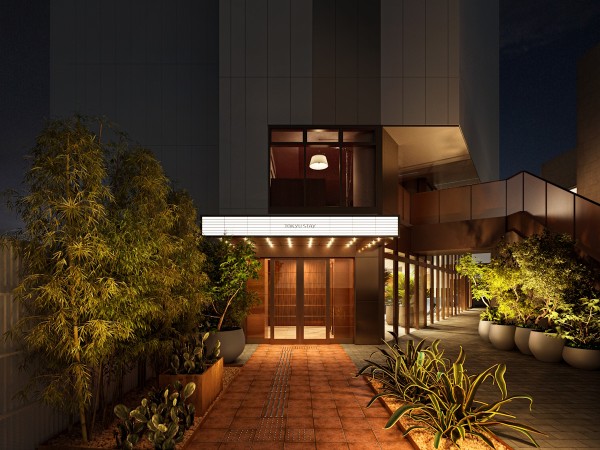
A theater-inspired entrance reflecting Shinjuku’s cinema culture
The renovated hotel adopts “SANKADO SQUARE” as its design concept. From the moment guests step inside, they are immersed in a space inspired by the diverse cultural elements of Shinjuku Sanchome.
The 14-story hotel features a lobby and reception area on the first floor, while the second floor houses a fitness gym, a record space featuring music from a wide range of genres, a guest-exclusive lounge, and selected guest rooms.
The design of the common areas draws inspiration from iconic Shinjuku experiences, including cinema culture, traditional coffee shops, and yose theaters. The space captures both the energy of the neighborhood and the lasting impressions created by its unique atmosphere.
The second-floor common area is inspired by the atmosphere of a jazz club
Guest rooms occupy floors 3 through 13, with 10 rooms on each floor: six double rooms, three triple rooms, and one quadruple room. The top floor, the 14th floor, features one suite with panoramic views and four double rooms.
The hotel will offer a total of 120 guest rooms, with a maximum capacity of 300 guests.
A Unique Stay Experience at the “Re:cord Lounge”
The guest-exclusive Re:cord Lounge is inspired by a retro jazz club and is open from 7:00 a.m. to 9:00 p.m.
Designed with the atmosphere of a vintage jazz club, the Re:cord Lounge is a retro-inspired lounge exclusively available to hotel guests and open daily from 7:00 a.m. to 9:00 p.m.
From 7:00 to 11:00 a.m., guests can enjoy an English-style breakfast buffet featuring croque monsieur as a signature menu item. Breakfast can also be enjoyed privately in guest rooms through a takeaway breakfast box.
From noon onward, the lounge becomes an open space where guests can select records to play, create their own melon cream soda, and enjoy a variety of café-style offerings.
Guests can also enjoy cocktails and mocktails inspired by the lounge’s record collection, as well as sparkling wine.
A Variety of Guest Rooms
Guest rooms are themed around a “studio,” featuring flexible layouts designed for various stay styles in compact yet comfortable spaces
The guest rooms are designed around the theme of a “studio.”
Sophisticated color selections and flexible layouts create compact yet comfortable spaces that accommodate a variety of travel styles. Like an artist’s studio, the rooms provide guests with a creative atmosphere where they can relax and enjoy their stay.
The creative direction and spatial design for the renovation were handled by NOMURA Co., Ltd.
Led by Design Director Junichi Saito and Designer Kohei Fujinaka, the team renewed the entire hotel under a consistent concept, from the overall spatial design to the smallest details.
Hotel Signage Design: “A Balance Between Deviation and Order”
This renovation focuses not only on spatial design but also on every aspect of the hotel’s visual communication, from the reception area to floor guidance signage.
The signage design was created by Issei Nomura of Tyle, a design studio specializing in a wide range of visual expression, from typography to graphic design.
The concept, “A Balance Between Deviation and Order,” explores the relationship between freedom and structure. Rather than adhering to a single visual style, the design combines various typefaces to create a unique expression where spontaneous elements coexist with harmony and order.
Like an improvised jazz performance, different individual elements interact and resonate with one another, creating unexpected harmony from a diverse collection of expressions. The design aims to bring depth and spontaneity into the hotel environment.
Landscaping and Exterior Design
The exterior of Tokyu Stay Shinjuku pays tribute to Shinjuku’s history as a center of cinema culture, adopting a design reminiscent of entrances to cinemas and theaters from the past.
Its appearance reflects respect for Shinjuku’s nostalgic cinema culture and the atmosphere of the Showa era (1926–1989), which continues to influence the neighborhood today.
The landscaping at the entrance and throughout the hotel embodies the “SANKADO SQUARE” concept. Kinmei mousouchiku bamboo, recognized for its beautifully variegated trunks, is combined with succulent plants and cacti, including prickly pear and agave.
The harmonious landscape created by these contrasting plants represents the character of Shinjuku Sanchome itself, where diverse cultures come together and overlap in an almost improvised way.
The landscaping was created by landscape designer Kei Amano of YardWorks Inc.
Guided by his philosophy of “THE ART OF LIFE,” Amano brings together traditional craftsmanship and contemporary sensibilities, creating a distinctive aesthetic reflected throughout the hotel.
Unique Experiences at Tokyu Stay Shinjuku
Tokyu Stay Shinjuku aims to serve not simply as a place to stay, but as a hub connecting guests with the surrounding neighborhood by offering experiences that showcase the distinctive culture and character of Shinjuku.
PATCH & PLAY: A Patch Workshop
The first-floor lobby offers experiences including the PATCH & PLAY patch workshop
A permanent workshop booth will be installed in the first-floor lobby, where guests can choose original patches inspired by Shinjuku’s culture and memories, then attach them to clothing, bags, and other personal items.
Through this experience, guests can discover the history and culture of Shinjuku while creating a one-of-a-kind travel keepsake.
The first collaboration features DUG, a legendary jazz café and bar that has been loved by cultural figures since its establishment in 1961 and is known as one of Shinjuku’s iconic destinations for music lovers.
A limited-edition Shinjuku patch featuring DUG’s iconic logo will be produced and sold as part of the collaboration.
Additional collaborations with notable local establishments are planned, with a series of limited-edition patches incorporating stories from Shinjuku to be released over time.
Local Photo Tour of Shinjuku by MagicalTrip Inc.
Tokyu Stay Shinjuku is partnering with local tour company MagicalTrip to offer guests an immersive exploration of Shinjuku.
The planned “Shinjuku After Dark Photography Tour” (working title) is a private photo experience that begins with hotel pickup.
Accompanied by a local guide, guests will visit photogenic locations representing Shinjuku, including Kabukicho and historic shrines connected to the neighborhood’s culture, while having photographs taken throughout the experience.
The tour was created with the needs of family and couple travelers in mind, recognizing that opportunities to capture photos featuring everyone together are often limited during trips.
Local guides, including professional photographers, will capture memorable moments as guests explore the city.
Guests can discover sides of Shinjuku that do not appear in guidebooks while experiencing the neighborhood with people who know it firsthand.
Limited premium tours are also being planned and will be offered periodically.
Tokyu Stay Shinjuku — Hotel Overview
Opening Date:
September 29, 2026 (Tuesday)
Address:
3-7-1 Shinjuku, Shinjuku-ku, Tokyo
Access:
8-minute walk from the East Exit of JR Shinjuku Station
1-minute walk from Exit C3 of Shinjuku-sanchome Station on the Toei Shinjuku Line and Tokyo Metro Lines
Official Website:
https://www.tokyustay.co.jp/hotel/SJ/
Official Instagram:
https://www.instagram.com/tokyustay_connected/
Creative Direction, Spatial Design and Supervision: NOMURA Co., Ltd.
About Tokyu Stay (Tokyu Resorts & Stay Co., Ltd.)
Under the concept of “Stay Connected.”, Tokyu Stay creates opportunities for guests to connect with local communities and cultures throughout Japan.
The brand offers unique stays that inspire new discoveries and allow guests to reconnect with themselves through meaningful travel experiences.
Official Website:
https://www.tokyustay.co.jp/
Media Contact
Organization: Tokyu Resorts & Stays Co., Ltd.
Contact Person: Kana Shibata
Website: https://www.tokyu-rs.co.jp/
Email: Send Email
Address: Shibuya Dogenzaka Tokyu Building 1-10-8 Dogenzaka, Shibuya-ku
City: Tokyo
Country: Japan
Release id: 49522
The post Tokyu Stay Shinjuku Reopens on September 29, 2026, Bringing Shinjuku Culture to Life Through Design appeared first on King Newswire. This content is provided by a third-party source.. King Newswire makes no warranties or representations in connection with it. King Newswire is a press release distribution agency and does not endorse or verify the claims made in this release. If you have any complaints or copyright concerns related to this article, please contact the company listed in the ‘Media Contact’ section
About Author
Disclaimer: The views, suggestions, and opinions expressed here are the sole responsibility of the experts. No Digi Observer journalist was involved in the writing and production of this article.
S&B Foods Inc. is set to launch UMAMI TOPPING, a key product for overseas markets, in Europe, starting with the UK.
Tokyo, Japan, 29th Sep 2026 – UMAMI TOPPING, a condiment that expands the potential of toppings S&B Foods Inc. is set to launch UMAMI TOPPING, a key product for overseas markets, in Europe, starting with the UK.

UMAMI TOPPING: Relish the Crunch
UMAMI TOPPING is a versatile umami seasoning developed as a topping-style condiment developed for overseas markets based on the Okazu La-yu (Chilli Oil) sold in Japan. Unlike conventional chilli oil, Okazu La-yu contains fried garlic and other ingredients, and has established a new category of chilli oil in Japan thanks to its chunky texture. In Japan, consumers appreciate Okazu La-yu for its wide variety of ingredients and its perfect balance of spiciness and umami flavours.
Source: Our own research, July 2022 (people who have previously purchased crunchy garlic with chilli oil), excerpt of the top nine items.
UMAMI TOPPING capitalises on these characteristics to offer a highly versatile product. Simply drizzle the flavourful oil over sushi, meat dishes, salads and more to add a touch of flavour and crunch. Unlike traditional seasonings and condiments, the product is designed to be used as a topping, making it an easy way to complement and enhance existing recipes. As a garlic chilli topping with a distinctive crunchy texture, UMAMI TOPPING can be used in a wide range of applications across both the restaurant and retail sectors, opening up possibilities for creative promotional displays and menu suggestions.
UMAMI TOPPING
UMAMI TOPPING brand website:
https://www.sbfoods-worldwide.com/europe/umami-topping
The Japanese Crunchy Garlic with Chilli Oil Market and the Background to the Development of UMAMI TOPPING
UMAMI TOPPING was developed from the same category of crunchy chilli oil that can be enjoyed as a food accompaniment, represented by the Okazu Chilli Oil sold by S&B Foods in Japan.
Looking at the overall chilli oil market in Japan, the market expanded rapidly following the launch of Okazu Chilli Oil in 2010. Since then, the category has become firmly established and has maintained a consistent market size.UMAMI TOPPING, which was launched as an export-only version of the Okazu Chilli Oil sold in Japan, has seen a significant increase in sales in recent years. It is now positioned as a major product alongside curry and wasabi, with sales reaching levels comparable to those of Okazu Chilli Oil in Japan.
*Jan 2017 to Dec 2025: Estimated retail sales in the chilli oil market, provided by Intage SRI+
*Jan 2008 to Dec 2016: Our own research
Growth and Popularity in Overseas Markets (United States, Asia)
UMAMI TOPPING is steadily gaining ground in overseas markets.
– Widely used in the United States as a topping for sushi rolls
It is also used in a wide range of applications, from seafood dishes such as carpaccio and sashimi to ramen toppings and gyoza dumplings.
Its balance of texture and spiciness is highly regarded.
– Established as a topping for both restaurant meals and home cooking in South Korea
It is used on a variety of dishes, including rice porridge, noodle dishes and vegetable dishes.
Consumers enjoy its crunchy texture, spicy flavour and versatility, and sales continue to grow.
These diverse ways of using UMAMI TOPPING have led to increased sales. In 2025, S&B Foods added UMAMI TOPPING SPICY to the lineup in the United States and South Korea, combining intense spiciness with umami flavour.
The company also reviewed the ingredients of the original UMAMI TOPPING and removed almonds, an allergen, so that more customers can enjoy the product with peace of mind.
Sushi with UMAMI TOPPING
Key Points of Development for Europe (Behind the Scenes of the Product Launch)
S&B Foods made the following optimisations for the European market:
– Regulatory compliance and quality assurance
Adoption of new ingredients that comply with strict European food regulations.
Use of non-GMO ingredients to comply with local standards.
– Product variations
Two varieties, MILD and SPICY, have been created to meet the needs of consumers with different spice preferences.
MILD
– A subtly spicy flavour that enhances dishes with its distinctive texture, crunch and exquisite umami.
– Mainly intended to be used as a topping, making the most of its intense umami and crunchy texture.
– Recommended as a topping for sushi and hot dogs.
SPICY
– An intense spiciness that will also appeal to fans of Asian cuisine.
– Can also be used as a seasoning or to add a piquant accent to dishes.
– Recommended for adding a touch of spice to ramen or gyoza dumplings.
What sets UMAMI TOPPING apart is not only its unique topping format, but also its authentic Japanese origin and rich umami flavour.
Benefits of Introducing UMAMI TOPPING to the Retail Market
In the UK, topping-style seasonings such as Crispy Chilli Oil and Chilli Crunch are becoming increasingly popular. By offering not only spiciness but also a distinctive umami flavour, UMAMI TOPPING can differentiate itself from existing products in the category and drive stronger shelf sales.
UMAMI TOPPING offers the following benefits:
– “UMAMI” products that are directly aligned with Japanese food trends
– Highly versatile for use as a topping on a variety of dishes
– Easy to display through in-store merchandising as an instant flavour-boosting product
– Scalable shelf allocation thanks to the introduction of different varieties (MILD/SPICY)
Katsu Curry with UMAMI TOPPING Recipe
https://www.sbfoods-worldwide.com/europe/umami-topping/recipe02/
Hot Dog with UMAMI TOPPING Recipe https://www.sbfoods-worldwide.com/europe/umami-topping/recipe03/
Hot Dog with UMAMI TOPPING
European Expansion
August 2026
Sales are scheduled to start at Japanese and Asian supermarkets in Europe, beginning with the UK.
These include Japan Centre and Oseyo.
October 2026
S&B Foods will operate a stall at JAPAN MATSURI in London, where visitors will be able to sample UMAMI TOPPING.
Japan Matsuri London – JAPAN MATSURI 2026 will return to Trafalgar Square, the date of event will be announced shortly. https://japanmatsuri.com/
Through UMAMI TOPPING, S&B Foods will expand the value of Japanese food culture globally and create a new food scene.
Company Overview
S&B – Authentic Taste of Japan
S&B Foods Inc. is a Japanese food manufacturer with a core focus on spices, herbs and seasonings.
Since its establishment in 1923, S&B Foods has established a strong position in the Japanese curry and spice categories and is expanding its business in North America, Asia and Europe, backed by a diverse product portfolio and a stable supply system.
The company develops products that align with the food culture and comply with the regulations of each market, and is working to expand its seasoning business globally.
Official Instagram (UK):
https://www.instagram.com/sbfoods_uk
S&B Foods Global Site:
S&B Foods UK website – Authentic Taste of Japan
Media Contact
Organization: S&B Foods Inc.
Contact Person: Takuma Hosoda
Website: https://www.sbfoods-worldwide.com/europe/umami-topping/
Email: Send Email
Address: 18-6, Nihonbashi Kabuto-cho, Chuo-ku
City: Tokyo
Country: Japan
Release id: 49520
The post Crunchy Garlic with Chilli Oil from Japan Arrives in Europe appeared first on King Newswire. This content is provided by a third-party source.. King Newswire makes no warranties or representations in connection with it. King Newswire is a press release distribution agency and does not endorse or verify the claims made in this release. If you have any complaints or copyright concerns related to this article, please contact the company listed in the ‘Media Contact’ section
About Author
Disclaimer: The views, suggestions, and opinions expressed here are the sole responsibility of the experts. No Digi Observer journalist was involved in the writing and production of this article.
Press Release
The Franchise King Releases New Guide to Using AI for Franchise Research and Franchise Buying
New digital guide shows franchise buyers how to correctly use AI for due diligence, with 52 prompts along with warnings about where AI franchise research can go wrong.
United States, 29th Sep 2026 — Joel Libava, known as The Franchise King®, today announced the release of “The Franchise Buyer’s AI Playbook,” a digital guide that gives prospective franchise buyers 52 ready-to-use AI prompts for researching and vetting a franchise opportunity, paired with direct warnings about where AI tools can mislead them.
Franchise buyers are already using ChatGPT, Claude, and Gemini to research potential opportunities, often without realizing where those tools fall short. AI can organize research and translate legal language quickly. It cannot verify a franchisor’s financial health, sit in on a validation call, or interpret a franchise agreement with legal authority. Libava’s guide is built around that distinction.
“People are already asking AI whether they should buy a franchise, and getting confident-sounding answers back,” said Libava. “The problem isn’t that AI is useless here. It’s that nobody’s told buyers exactly where it can quietly get them hurt. That’s the entire reason this guide exists.”
The guide organizes its 52 prompts around the real buyer journey: 13 prompts for finding a franchise that actually fits a buyer’s money, skills, and schedule; 26 prompts for researching a specific opportunity, including how to interrogate a franchise’s financial performance disclosures instead of accepting a misleading average; and 13 prompts for making a final decision without being pushed by sales pressure or sunk-cost thinking.
“Anyone can hand you a list of prompts,” said Joel Libava, The Franchise King. “What I built is the research process I’ve used with buyers for 25 years. The prompts get you the answers — the workbook and 7-Day Quick-Start Plan tell you what to do with them. That’s the difference between a novelty and a real tool for franchise buyers.” Every detailed prompt includes a plain-language warning describing exactly how an AI tool’s answer can be incomplete or wrong, a feature not found in franchise content produced by parties with a financial incentive to keep a buyer moving toward a purchase.
Libava has spent more than 25 years advising franchise buyers. He is the author of two books on franchising, spent eight years as the exclusive franchise contributor to the U.S. Small Business Administration’s blog, and has been featured in The New York Times, Forbes, CNBC, and Entrepreneur.
“The Franchise Buyer’s AI Playbook” is available now for at thefranchiseking.com. It includes a full glossary of franchise terminology, a chapter addressing common franchising myths, including the assumption that AI alone can determine whether a franchise is a good investment and bonuses including helpful worksheets that will help franchise buyers organize the information they’ve collected.
For more information, or to request a review copy or interview with Joel Libava, contact: Joel Libava
Phone: 216-831-2610
Email: Joel@thefranchiseking.com
Website: https://www.thefranchiseking.com
https://www.thefranchiseking.com/the-franchise-buyers-ai-playbook
Media Contact
Organization: Franchise Selection Specialists Inc.
Contact Person: Joel Libava
Website: https://www.thefranchiseking.com
Email: Send Email
Country: United States
Release id: 49516
The post The Franchise King Releases New Guide to Using AI for Franchise Research and Franchise Buying appeared first on King Newswire. This content is provided by a third-party source.. King Newswire makes no warranties or representations in connection with it. King Newswire is a press release distribution agency and does not endorse or verify the claims made in this release. If you have any complaints or copyright concerns related to this article, please contact the company listed in the ‘Media Contact’ section
About Author
Disclaimer: The views, suggestions, and opinions expressed here are the sole responsibility of the experts. No Digi Observer journalist was involved in the writing and production of this article.
Tokyu Stay Shinjuku Reopens on September 29, 2026, Bringing Shinjuku Culture to Life Through Design
Crunchy Garlic with Chilli Oil from Japan Arrives in Europe
Bake3D Introduces AI-Powered 3D Character Generation, Rigging and Animation for Digital Creators
Benzinga Money Article Discusses How to Become Part of the 12% of Retirees Who Have Achieved the Recommended $550,000 Minimum Retirement Savings Threshold
Apu Apustaja Conquers New York with Lively Street Ads, Including Times Square Billboard
Bay Smokes Maintains Quality Amid Legislative Changes in the Hemp Industry


-
Press Release6 days ago
Airwheel Wins European Product Design Award for AI Wheel Cabin 20 Inch Luxury Smart Scooter Carry on Hand Boarding Travel Electric Suitcase
-
Press Release5 days ago
Thomas Berkley of Nexus Acquisition AI Introduces Smarter Client Acquisition Strategies for Service Businesses
-
Press Release7 days ago
Quoin Pharmaceuticals Announces FDA Fast Track Designation for QRX003 for the Treatment of Peeling Skin Syndrome
-
Press Release1 week ago
From Korean Chipmakers to Leveraged Semiconductor ETFs: STARTRADER Launches 49 New 24/7 Stock and ETF CFDs
-
Press Release3 days ago
Piya Saliba Releases Free Community Connection Checklist to Help People Build Stronger Relationships
-
Press Release4 days ago
Whimsical Halloween Wardrobe Ready: Arshiner Kids’ Outfits Light Up the Trick-or-Treat Adventure
-
Press Release3 days ago
Gary Bassett Shares Lessons From 45 Years Across Finance and Technology
-
Press Release3 days ago
Painted Brick Digital Named Among Expertise.com’s Top 8 Legal Marketing Companies in Scottsdale